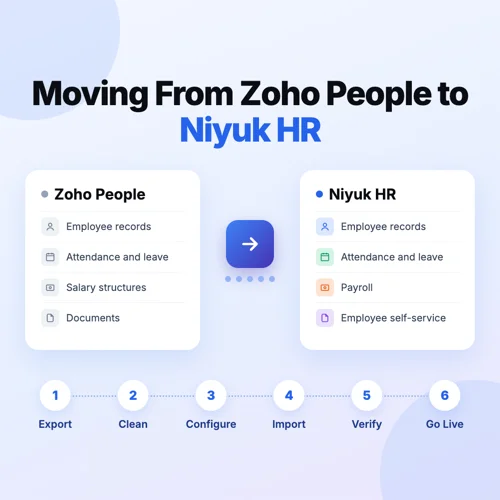
Many companies start on Zoho People because the HR module is low cost to begin with. The trouble starts when they need payroll, hiring and project tracking too, and end up paying for and setting up Zoho Payroll, Zoho Recruit and Zoho Projects as separate apps.
Moving to a new HR system can feel risky. Will employee records come across correctly? Will leave balances match? Will the first payroll be right? Most of that risk comes from rushing. If you know your data, clean it before it moves, and check payroll before you go live, the switch does not have to disturb your HR team's month.
Moving out of Zoho People usually means moving data out of more than one Zoho app. This guide walks you through the whole move to Niyuk HR: what to plan, what data to bring across, the steps in order, the mistakes to avoid, and what to check after you go live. If you are still deciding between the two products, start with our Niyuk HR vs Zoho People comparison.
When Is It Time to Move Away from Zoho People?
Teams rarely leave Zoho People because the HR module stopped working. They leave because the company has changed around it. These are the most common signs.
You are paying for several Zoho apps
Zoho People does not include payroll. Running payroll for employees in India needs a Zoho Payroll subscription, and hiring and projects need Zoho Recruit and Zoho Projects. The low starting price grows into three or more bills.
Setup and fixes span more than one app
Getting Zoho People right for India means setting up Zoho Payroll too and keeping the two connected. When a problem involves both apps, the fix can take longer because more than one team has to look at it.
Goals and tasks live somewhere else
Zoho People has no OKRs and no task management. If managers set goals and track work in other tools, the same people are being managed in several places.
You want everything in one place
Separate apps for HR, payroll, hiring and projects mean the same employee details are kept in more than one place. One HRMS for all of it cuts that repeat work.
If one or more of these sounds familiar, the rest of this guide shows you how to plan the move properly.
What Data Moves from Zoho People to Niyuk HR?
Before you start, list everything your team keeps in Zoho People today, and in Zoho Payroll if you use it. Most companies bring across the records below. The second column is what to check before each one moves.
| Data | What to check before you move it |
|---|---|
| Employee master data | Names, employee IDs, joining dates, departments, designations and reporting managers are complete and up to date |
| Employee documents | Offer letters, ID proofs and contracts are saved against the right employee |
| Leave balances | Balances are correct on the cut-off date, including carry forward and encashment |
| Leave and holiday policies | Leave types, rules and holiday calendars for every location are written down |
| Attendance and shifts | Shift timings, weekly offs and attendance rules are listed, along with any pending corrections |
| Salary structures | Every salary component, allowance and deduction is listed for each employee |
| Payroll history | Past payroll runs in Zoho Payroll are final and match what was paid |
| Statutory details | PF, ESI, professional tax, LWF and TDS details are correct for each employee |
| Tax declarations | Investment declarations and proofs for the current financial year are up to date |
| Approval workflows | Who approves leave, attendance corrections and other requests is noted down |
Confirm with the Niyuk team which records will be imported and which will be set up fresh in Niyuk HR, so nothing falls between the two.
How Niyuk Helps You Move
You do not have to do the move on your own. Niyuk HR gives you dedicated onboarding support and a named onboarding team during the migration.
- Data migration: the onboarding team moves your data across from Zoho People.
- Setup: the team sets the system up and makes sure everything is ready to go.
- India rules built in: leave policies and payroll rules for India are already in place, so you adjust them rather than build them.
- One system to set up: HR, payroll, hiring and projects are in the same product, so there is no second app to connect.
Your part is to share clean data, tell us how your policies work, and check the results before you go live. The steps below show how that fits together.
Plan the Move Before You Start
A little planning saves a lot of fixing later. Settle these four things first.
Pick the right date
Move between payroll cycles, not in the middle of one. The start of a month works well, and the start of a quarter or financial year is even easier for statutory records and tax declarations.
Decide who owns the move
Name one person from HR and one from finance or payroll. They answer questions, check the data and sign off before go-live.
Keep a full backup
Download and save all your Zoho People records before you change anything. You will need them to check the new system, and you may need them later for audits.
Tell your employees
Let people know when the switch will happen, how they will log in to Niyuk HR, and where to go if something looks wrong.
How to Migrate from Zoho People to Niyuk HR: Step by Step
Step 1: Review your current HR setup
List what your team does in Zoho People today, and what it does in other Zoho apps or outside Zoho: payroll, attendance, leave, hiring, onboarding, reviews and reports. This tells you what has to work in Niyuk HR from day one.
Step 2: Export your data from Zoho People and Zoho Payroll
Download the records you listed earlier. Employee details sit in Zoho People and salary and statutory records in Zoho Payroll, so export from both:
- Employee names and IDs
- Department and designation details
- Joining dates and employment status
- Contact and reporting information
- Leave balances
- Salary structures and statutory details
- Payroll and attendance records you need to keep
Ask the Niyuk team which file formats they need, and keep a secure copy of everything you export.
Step 3: Clean and check the data
Wrong or duplicate data in the old system becomes wrong data in the new one. Look for missing details, people who have left, duplicate entries and dates in different formats. Take extra care with salary and statutory details, because small errors there change what people are paid.
Step 4: Set up Niyuk HR
Your onboarding team sets up your company details, departments, designations, leave policies, holiday calendars, attendance rules, approval workflows and payroll settings. Check that each one matches how your company actually works, not how it worked when you first set up Zoho People.
Step 5: Import a small batch first
Start with a few employees, ideally from different departments, locations and salary types. Check that their records look right before the rest are brought in.
Step 6: Check attendance, leave and payroll
Once everyone is in, check leave balances, attendance settings, salary components and deductions. Then run a test payroll in Niyuk HR for the last completed month and compare it with what Zoho People paid. Any difference should have a clear reason before you move on.
Step 7: Train your HR team, managers and employees
HR admins learn how to manage records and run payroll. Managers learn how to approve leave and attendance. Employees learn how to log in, see payslips and apply for leave. Short sessions work better than one long one.
Step 8: Go live and watch the first payroll
Switch on the date you planned. Check the first payroll run closely, line by line if you need to, and keep your Zoho People exports until you are sure everything matches.
Common Migration Mistakes and How to Avoid Them
| Mistake | How to avoid it |
|---|---|
| Switching in the middle of a payroll cycle | Pick a go-live date at the start of a month, after the last Zoho People payroll is closed |
| Moving dirty data | Remove duplicates and people who have left, and fill missing details before the import |
| Leave balances that don't match | Freeze leave balances on the cut-off date and check them again after the import |
| Salary components set up differently | Run a test payroll for a past month and compare it with Zoho People, employee by employee |
| Losing track of tax declarations | Carry over each employee's declarations and proofs for the current year before the first live payroll |
| Exporting from only one Zoho app | Export from Zoho People and Zoho Payroll, and from Zoho Recruit or Projects if you use them |
| Forgetting connected tools | List every tool linked to Zoho People, such as Zoho CRM, Zoho Books and biometric devices, before you start |
| Employees left out of the loop | Tell people the go-live date and how to log in at least a week before the switch |
HRMS Migration Checklist Before You Switch
Before moving from Zoho People to Niyuk HR, make sure you have done the following:
- Listed the HR processes your team runs in and outside Zoho People
- Picked a go-live date between payroll cycles
- Named the HR and payroll owners for the move
- Exported and backed up all Zoho People and Zoho Payroll records
- Listed the Zoho apps connected to Zoho People, such as CRM and Books
- Cleaned and checked employee data
- Confirmed which records will be imported and which set up fresh
- Set up leave, attendance and payroll policies in Niyuk HR
- Imported and checked a small batch of employees
- Checked leave balances and tax declarations after the full import
- Run a test payroll and compared it with Zoho People
- Trained HR admins, managers and employees
- Told employees the go-live date and how to log in
What to Check in Your First Month on Niyuk HR
Going live is not the finish line. Keep an eye on these in the first few weeks:
- Attendance is coming in correctly from every location and shift
- Leave requests reach the right manager, and balances go down as expected
- The first payroll matches what you expected, with PF, ESI, professional tax and TDS correct
- Employees can log in and see their own payslips and leave
- Reports your HR and finance teams use every month are giving the right numbers
Keep your Zoho People exports for reference, in line with your company's record keeping policy.
Frequently Asked Questions
1. How long does it take to move from Zoho People to Niyuk HR?
Most companies go live on Niyuk HR within two to four weeks. The exact time depends on how many employees you have, how clean your data is, and how complex your payroll and policies are.
2. Will we lose any data when we switch?
Not if you plan it. Back up all your Zoho People records before you start, import a small batch first, and check leave balances and a test payroll before you go live.
3. Which records can we bring across from Zoho People?
Most companies bring employee details, documents, leave balances, salary structures, statutory details and the payroll and attendance history they need to keep. Confirm with the Niyuk team which records will be imported and which will be set up fresh.
4. Does Niyuk help with the migration?
Yes. You get dedicated onboarding support and a named onboarding team during the migration. The team moves your data, sets up the system and makes sure everything is ready to go.
5. When is the best time to switch?
Between payroll cycles, never in the middle of one. The start of a month works well, and the start of a quarter or financial year makes statutory records and tax declarations easier.
6. Can we check payroll in Niyuk HR before we stop using Zoho People?
Yes, and you should. Run a test payroll in Niyuk HR for a month you have already paid through Zoho People and compare the two before your first live run.
7. Will our employees need training?
A little. HR admins and managers need the most, and employees mainly need to know how to log in, see their payslips and apply for leave.
8. We use Zoho CRM and Zoho Books. Can we still move?
Yes, but plan for it. List every link between Zoho People and your other Zoho apps before you start, and ask the Niyuk team how each one will be handled.
9. What should we do with our Zoho People data after the switch?
Keep a full export for audits and reference, for as long as your record keeping policy requires.
Final Thoughts
Moving from Zoho People to Niyuk HR is mostly about preparation. Know your data, clean it before it moves, pick a date between payroll cycles, and check a test payroll before you go live.
Do those things and your HR team gets HR, payroll, hiring and projects in one system and one subscription, without a messy month. If you would like help planning the move, book a demo and talk to our team about your setup.