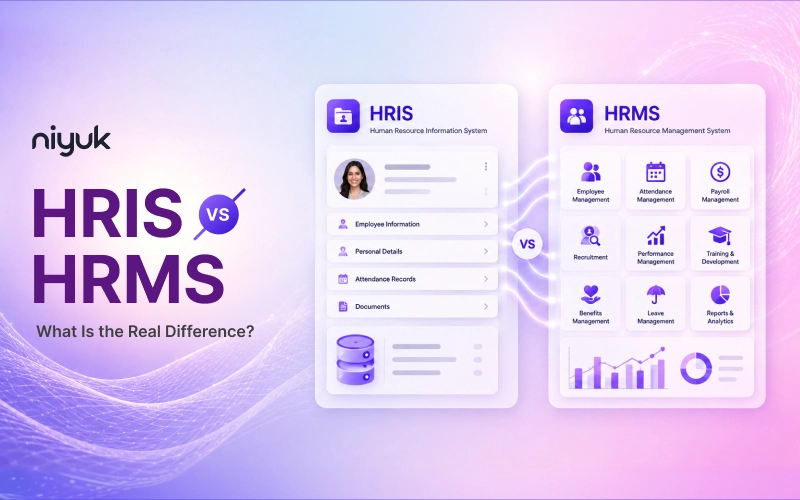
An HRIS (Human Resource Information System) is an HR software built to store and manage core employee data like records, payroll, and compliance. An HRMS (Human Resource Management System) includes everything an HRIS does, then adds strategic tools like performance management, talent acquisition, and workforce analytics. In short, HRIS handles the “what” of your workforce data, while HRMS handles the “what” and the “what next.”
If you searched for the comparison of HRMS vs HRIS, hoping for a straight answer instead of a marketing pitch, you’re in the right place. Below, you’ll find the actual technical distinctions, when each system makes sense, what they cost, and the questions people almost never think about asking before signing a contract.
Let us begin this blog article with understanding the concept of HRIS at the start.
What is an HRIS?

The HRIS full form is Human Resource Information System though nobody says it that way out loud; it’s pretty much what it sounds like.
Understanding the HRIS meaning clears up most of the confusion fast: It’s a digital filing cabinet. An HRIS system stores, organizes, and reports on employee info like personal details, job history, documents, compliance stuff. That’s the whole job really. Accuracy over everything else.
Most HRIS platforms stick to a narrow lane:
- A secure, centralized employee database
- Basic payroll processing with tax and deduction calculations
- Attendance and leave tracking
- Standard compliance reports with headcount, turnover, audit trails
- Benefits enrolment and tracking
What it’s genuinely not great at is running full workflows. It’ll hold the data an onboarding process needs, no problem. But it won’t walk a new hire through their actual first day the way a dedicated system would. Foundation, not the whole house. Worth remembering that distinction.
Who’s it for? Small teams, preferably. Businesses where the real problem is messy, scattered data not broken processes. Under 30, 40 people, and payroll accuracy is the thing keeping someone up at 1am?
Honestly, an HRIS alone might be plenty. No need to overbuy something you won’t use.
Strengths of HRIS
- Simplicity: HRIS platforms are built around easy use, so HR professionals can get up and running with minimal training and a genuinely short learning curve. A real advantage for lean teams without committed HR technology staff.
- Cost-effectiveness: These systems are typically priced well below full HRMS solutions, making them a practical fit for small and mid-sized businesses that don’t yet need advanced workforce functionality.
- Solid fundamentals: Payroll software, employee data storage, and benefits administration are handled reliably, covering the bulk of what a small organization needs daily.
- Dependable compliance support: Built-in compliance tracking ultimately supports businesses to stay current with labour law changes, keeping required records and reports accurate without constant manual oversight.
- Centralized data: Replacing spreadsheets and paper records with one accessible system minimizes errors and makes information retrieval much faster, benefiting HR staff and employees alike.
- A sensible initial point: Many HRIS platforms allow modules to be added as a business grows, so it’s possible to start lean and expand functionality afterward rather than replacing the system outright.
What is an HRMS?
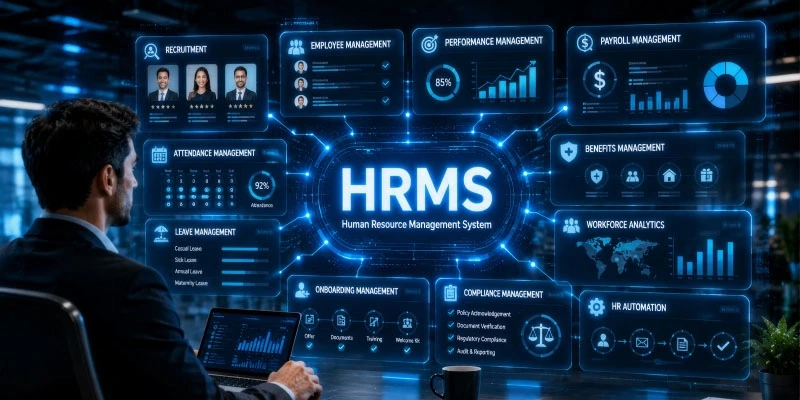
The HRMS meaning goes a step further than a records system. An HRMS system takes all an HRIS does and stacks a whole operational layer right on top of it. Instead of just holding employee data for other tools to dig through later, an HRMS runs the actual processes itself. Payroll, attendance, onboarding workflows, performance cycles, self-service etc. all in one place, connected, talking to each other.
That’s the core distinction, and it’s worth just sitting with it as one sentence. HRIS holds information. But HRMS acts on it. Two different jobs, even if they get called the same thing half the time.
A typical HRMS is built on:
- End-to-end onboarding, not just records about onboarding sitting somewhere
- Performance management: goals, reviews, ongoing feedback loops
- Richer, mobile-first employee self-service
- Real-time dashboards instead of a report someone must remember to export
- Workflow automation across the whole lifecycle, not payroll alone
This is really the sweet spot for growing, mid-sized business teams juggling hiring and onboarding and performance and payroll all at once, who need one system doing the coordinating instead of five spreadsheets held together with duct tape and hope.
Strengths of HRMS
- Built for the full employee lifecycle: HRMS platforms extend HRIS basics with talent acquisition, performance management, and workforce planning, covering everything from recruitment to retirement in a single system.
- Scalability: As headcount and HR complexity increase, HRMS platforms are made to absorb the growth, making them a future-proof investment for organizations expecting to grow significantly.
- Automation: Alongside payroll and benefits, HRMS platforms automate strategic functions such as performance reviews and succession planning, releasing HR teams to focus on high-value decisions over repetitive tasks.
- Meaningful reduction in manual error: Automating both administrative and strategic workflows lowering the risk of the human error that tends to creep into manual, spreadsheet-driven processes.
- Advanced reporting and analytics: Workforce analytics across recruitment, performance, and retention give HR teams the kind of data-driven insight that’s difficult to generate manually, supporting better talent and workforce decisions.
- Aligned platform for HR and business strategy: Because HRMS data spans the full employee journey, the insights it is producing tend to connect more directly to broad business goals, not only HR operations in isolation.
Difference between HRIS and HRMS
| Feature | HRIS | HRMS |
| Core focus | Store and manage employee data | Manage the full employee lifecycle |
| Typical features | Records, payroll, benefits, compliance | HRIS features + performance, recruiting, learning, engagement |
| Automation | Basic features i.e. payroll, attendance tracking | Broader features i.e. onboarding, performance, workflows |
| Employee self-service | Basic (view payslip, request leave) | Richer, mobile-first, more self-serve actions |
| Analytics | Standard compliance/headcount reports | Real-time dashboards, trend analysis |
| Customization | Often rigid | More flexible, configurable workflows |
| Best for | Small teams, basic HR needs | Growing/mid-size teams managing full lifecycle |
| Typical cost | Lower entry cost | Mid-range, usually more inclusive per module |
HRIS vs HRMS: The Real Differences, Explained
Scope of Functionality
HRIS solutions are administrative. HRMS solutions are administrative and strategic. If your HR function spends most of its time working with paper or administrative tasks, you can justify using HRIS. If the HR function also needs to track turnover, offer training or career pathing, or provide head-count forecast to your board, you need that added layer HRMS provides.
Target Company Size
HRIS platforms are often best for companies up to around 200 or 300 employees in situations that demand a very straightforward and linear HR strategy and don’t require talent team support. An HRIS is scaled to that, while an HRMS is designed to work in multiple departments, locations, and/or even countries.
Automation Depth
HRIS automation is often very transactional; compute that payroll, alert that this certification is coming due, track that leave request. HRMS automation goes into judgment-adjacent processes such as starting the performance cycle because someone has been around for a while, having a promotion flow through managers to approve it, and raising the flag on people who are likely to bail as measured by an engagement survey.
Analytics and Reporting
HRIS reporting tells us “what is going on” (e.g., headcount per department, quarterly attrition rate, amount of accrued PTO). HRMS analytics tell us “what may be going on and how do we deal with it” (e.g., predictive attrition model, peer group compensation analysis, cross-department skill gaps).
Examples of HRIS and HRMS Platforms
Understanding the difference between an HRIS and an HRMS supports you cut through marketing jargon and find the right platform for your team.
HRIS (Human Resource Information System)
An HRIS focuses on core administrative management. It acts as a single source of truth for basic employee data, compliance tracking, and standard payroll processing.
Best for: Businesses looking to organize central employee records and automate foundational HR tasks.
HRMS (Human Resource Management System)
An HRMS goes a step ahead by offering a fully integrated suite. It connects core payroll with broader talent management functions, including onboarding, performance tracking, and employee self-service portals.
Best for: Growing companies that need an all-in-one platform to manage the complete employee lifecycle.
Key Takeaway: Do not select software based on generic labels alone. Assess individual features against your company’s daily operational needs to make the smartest purchasing decision.
HRMS vs HRIS Pricing Overview
HRIS pricing is generally low, as these systems focus on core data storage and basic payroll functionality, with limited per-employee costs suited to small budgets. HRMS software pricing is higher.
That shows the wide range of automation features from onboarding processes, performance management to analytics modules.
Both solutions charge on a per-user-per-month basis, with the fees ranging on average depending on the number of modules used.
In the US, for example, HR software pricing starts from $8 to $30 per employee per month (PEPM), with simple HRIS plans accounting for the lowest point and full-scale HRMS solutions for larger organizations involving payroll, onboarding, performance management, and analytics charging at the higher end being enterprise-level and usually not publicly available.
In the Indian market, the comparable metric for HRMS solutions ranges from ₹45 to ₹1200 PEPM, with entry-level compliance-focused options and full-scale analytics and multi-module management solutions at the higher end. These are approximate figures that may vary significantly between vendors, regions, and sets of features, with most companies suggesting customized enterprise-level solutions.
When comparing HRMS vs HRIS cost, it is important to remember to account for additional expenditures beyond the unit price, including implementation and training, and remember that cheaper options may not scale with the business’s growth.
Where HRIS and HRMS Really Overlap?
HRIS and HRMS, both systems manage employee data. Both handle payroll and compliance, at least somewhat. And honestly, by 2026, most vendors just mix capabilities regardless of the label on the homepage. You’ll find “HRIS” tools running full onboarding flows, and “HRMS” tools that are, underneath the branding, basically a database with a payroll bolt-on.
The real line was never a hard feature wall anyway. It’s depth. HRIS holds the data. HRMS acts on it. Get that line into your head and the rest of the shopping process gets very cleared.
HRIS vs HRMS: Which One Does Your Business Actually Need?
This is the part that matters. Skip the feature lists, get to the decision.
Choose an HRIS-style system if:
- You’re under roughly 50 employees.
- Your main pain point is data accuracy and basic payroll, not workflow gaps.
- Keeping entry cost as low as possible matters more than anything else right now.
Choose an HRMS if:
- You’re managing, or about to manage, the full employee lifecycle hiring through performance.
- You’re growing fast and expect to outgrow a bare-bones system within a year or two.
- You want automation on onboarding, attendance, and performance, not just somewhere to dump data.
Most companies that start on a pure HRIS end up switching to an HRMS within 18 to 36 months. Right around when the workflow gaps (onboarding, performance, engagement) start costing real time, and eventually, real money. Not a scare tactic. Just how it tends to play out, again, across pretty much every company that’s lived through it. If you can already say, you’ll be one of those companies, starting with HRMS now saves you a genuinely painful mid-growth migration later. Ask anyone who’s done that migration. They’ll tell you.
Choosing the Right System for Your Business
Ask Yourself These Questions First
- How many hours a week does your team spend on manual data entry or spreadsheet reconciliation right now?
- Does your leadership ask for workforce data you currently can’t produce without days of manual pulling?
- Are you managing performance reviews, learning programs, or succession planning in separate tools (or not at all)?
- Do you operate across multiple states, countries, or entities with different compliance requirements?
- Is your HR team growing, staying flat, or shrinking relative to headcount?
If most of your answers point to “we just need our data in one clean, compliant place,” an HRIS is probably enough for now. If your answers point to “we’re already managing complexity our current tools can’t handle,” you’re likely ready for an HRMS.
Common Mistakes When Choosing Between HRIS and HRMS
- Buying for your current state rather than your future state. What is the best fit for your headcount now might be the single, most restrictive factor in your HRIS in a year and a half if your numbers double!
- Automatically assuming “HRMS” means astronomically expensive and overwhelmingly complex. Some vendors offer HRMS solutions at a price point similar to a higher-end HRIS solution. HRMS is definitely something worth considering even for companies in the mid-market.
- Overlooking integration requirements. If a platform cannot smoothly integrate with your company’s accounting, IT, and communications systems, you may as well be on paper no matter how many flashy HR functionalities they can demonstrate!
- Failing to run a demo with real data. Most demos are pre-loaded with data that is often unrealistic or non-representative of a true customer experience. Take full advantage of seeing a platform that mirrors the realities of your organization structure!
- Underestimating the change management costs. A system that has a wide range of functionalities will require extensive user training that needs to be considered both within your time and money budgets.
Conclusion
The real question was never which acronym sounds more impressive on a vendor’s homepage. Nobody’s picking software based on that. It’s which system really matches where your business is today, and where it’s realistically headed over the next year or two. Pick something that only solves today’s problem, and there’s a decent chance you’re back here in 18 months, migrating data, retraining everyone on something new, again. In the end, choose wisely in line with your business needs.
FAQs
Is HRMS the same as HRIS?
Not actually. Even though interchangeably constantly. HRIS focuses on storing and reporting employee data such as the record-keeper, basically. HRMS builds on that and runs HR operations: payroll, onboarding, performance management. Each HRMS requires HRIS-style data underneath it somewhere, but not each HRIS runs full HR workflows on its own.
What is the difference between HRIS and HRMS?
The difference between HRIS and HRMS is based on function, not much else. HRIS holds and organizes employee data including records, compliance and basic payroll. HRMS goes a step further, automating the actual HR processes: onboarding, attendance, performance reviews, self-service, all under a single connected system as opposed to five tools that no one fully trusts.
Can an HRIS handle payroll?
Yes. Most HRIS platforms include basic payroll processing, tax and deduction calculations, built right in. What they usually can’t do is connect payroll to bigger workflows, like performance-linked bonuses or automated pay setup during onboarding. For that level of integration across the whole lifecycle, you’d genuinely need a full HRMS.
Do small businesses need HRIS or HRMS?
Depends on where the actual pain is, honestly. Small businesses under 50 employees mainly wrestling with data and payroll accuracy often do fine on an HRIS. But if you’re hiring rapidly, or juggling onboarding, performance and engagement by hand, an HRMS tends to pay for itself fast than people expect going in.
What’s the difference between HRMS and HCM?
HRMS covers the daily payroll, attendance, performance and onboarding. HCM sits a level above that, adding strategic capabilities like succession planning, workforce forecasting, talent development. Generally built for large enterprises running complicated, multi-locational workforces not growing small or mid-sized businesses, still figuring out their footing.
How do you migrate from an HRIS to an HRMS later?
Usually means exporting employee records, payroll history, compliance documents from your HRIS, then importing all of it into the new HRMS during setup. Most vendors offer guided migration support these days, which helps. It’s manageable, but it does take real planning, which is exactly why a lot of growing teams just start with HRMS from day one instead.
What is an HRIS system, exactly?
HRIS software is used to keep track and store employee information (personal info, job history, docs, compliance info, etc.) in a single centralized location where you can quickly search and locate this information. These are a system of record. It does not “do” HR for you.
What does HRIS stand for?
HRIS stands for Human Resource Information System. It’s the record-keeping layer of HR technology, focused on accuracy and centralized data rather than running day-to-day operations.
What is an HRMS portal?
An HRMS portal is typically the employee-facing side of an HRMS platform. And the self-service login where staff view payslips, apply for leave, and update personal details, while HR manages everything from the admin side of the same system.