Introduction
Did you ever find yourself posting the same job vacancy on multiple job websites and wasting a lot of time collecting your candidate’s data? Or did you hire someone but waste a lot of time entering their data into your HRMS and payroll? It’s something very common that happens to HR specialists and recruiters.
Using different software for recruitment, employee management, and payroll, you may find the process rather time-consuming as far as managing your data is concerned. Re-entering data, not updating it, duplication of data, and delay in obtaining candidates’ data can all become an issue.
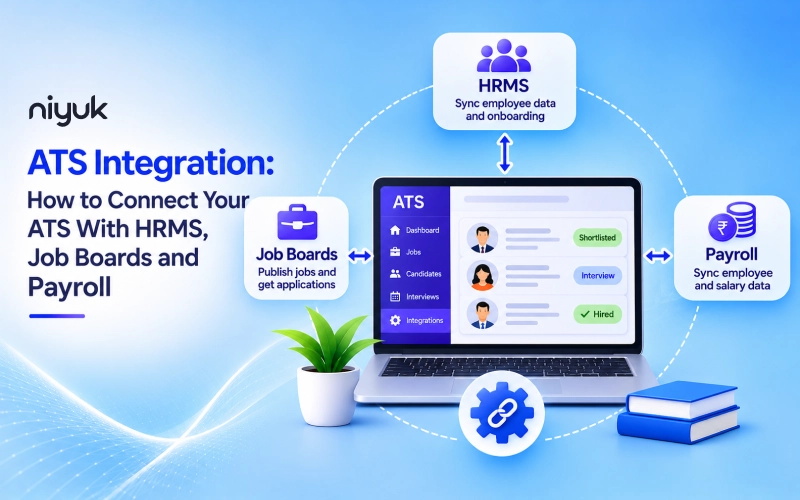
But ATS integrations could solve all these issues for you. They integrate your Applicant Tracking System (ATS) with other systems within your business. This means you can transfer the correct data between systems. This helps to remove manual tasks, ensure accurate data, and streamline your recruitment process.
In this blog we will talk about what ATS integrations are, how to integrate your ATS with your HRMS, job boards and payroll software, the benefits of doing so, common issues and best practice.
What Is ATS Integration?
ATS integration is defined as the integration of an Applicant Tracking System with other systems. It enables the sharing of data across multiple systems and automates the recruitment processes. ATS Integrations can be used by organizations to connect their recruiting systems with HR software and control information for the entire lifecycle of their employees.
For example, if your job portal is integrated with your ATS, then all the information entered by the applicant while applying for a job will automatically get entered into your ATS. If the applicant gets selected, then all the necessary information will be entered into your HRMS system to begin the onboarding process.
Similarly, if your ATS is integrated with your payroll system through your HRMS, then all the necessary information about the new hire can be entered into the payroll system.
This ensures that no duplicate data entry is required and the process becomes very efficient.
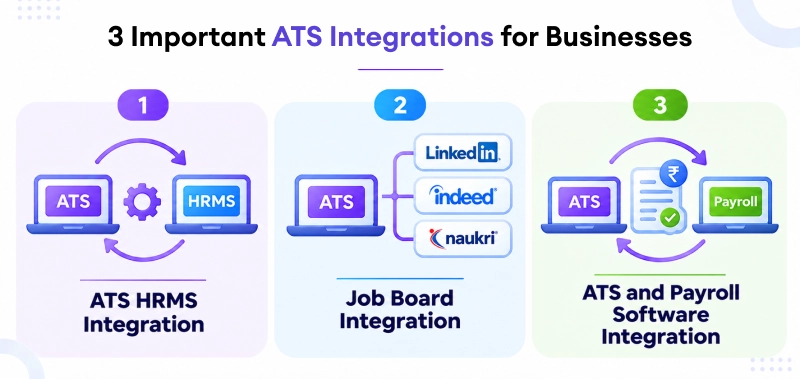
3 Important ATS Integrations for Businesses
Depending on how they hire their new candidates and what software they currently use, there are several different integrations that would benefit them. These three would be:
1. ATS HRMS Integration
ATS HRMS Integration – This is where the hiring software integrates with your HRMS to move candidate information to your employee management system once the candidates have been hired.
How does it work?
If the candidate is marked as ‘hired’ in your ATS, then you will be able to transfer the following important data to your HRMS system;
- Name and contact information of the candidate.
- Job position and department.
- Joining date and type of employment.
- Recruitment documents collected (if any).
This way, your HR department will be able to generate an employee profile and start the onboarding process without any duplication of data.
Key benefits:
- Reduces manual data entry during onboarding.
- Keeps employee information consistent.
- Enhances coordination between recruitment and HR teams.
- Faster onboarding process.
Moreover, in case you are considering implementing some new HR technology, it will be able to demonstrate to you how HRIS and ATS can work together in managing your recruitment and employee data.
2. Job Board Integration
The roles will be listed in several job websites by the recruiters to attract suitable candidates for the particular job posting. This can sometimes become a difficult process when it comes to managing such jobs and applications.
Job board integration gives you the ability to post roles and receive applications through your ATS and supported job sites.
How does it work?
For example, creating a vacancy on the ATS will enable you to post the vacancy on the supported job sites. You can collect applications from these sites and store them in your ATS.
You can then manage applications, shortlist candidates and track their progress within the ATS.
Key benefits:
- Makes it easy to advertise roles on multiple platforms.
- Gathers applications into one central place.
- Makes it easier for recruiters to compare your candidate sources.
- This simplifies application management greatly.
This becomes especially helpful when you have more than one position that you need to fill.
3. ATS and Payroll Software Integration
ATS stands for Applicant Tracking System, which is used to handle the recruiting process, while Payroll software is used to handle the payroll process. An integration of ATS with payroll software facilitates organizations in sharing employee information.
How does it work?
Depending on how your business is organized, information about candidates may be transmitted from the ATS to the HRMS and ultimately to payroll systems. This might include:
- Employee name and ID
- Department and job title
- Joining date
- Employment type
- Approved salary details
It will help the payroll department in preparing the employees’ records in order to pay salaries.
Key benefits:
- This will save time in entering employee details.
- Facilitate Payroll staff in creating employee records easily.
- Improved collaboration between HR and Finance departments.
- Reduces errors that may result from wrong data input.
It is important to know that the ATS will not replace your payroll software; you can still compute the salaries, do the deductions, keep tax records, and issue payslips through the payroll system.
How to Integrate Your ATS With Other HR Tools
The following are some steps that you should undertake in order to make the integration successful.
Step 1: Understand the requirements
List down the software that your company uses like HRMS, job board, and payroll. Define the processes you wish to automate and data that will be transferred during automation.
Step 2: Check ATS integration capabilities
Check whether the applicant tracking system provides pre-built integrations, APIs or third-party integration tools. Check that the other software supports integration as well.
Step 3: Map you Data Fields
Determine what information you want to exchange between systems. For example, it can be about the exchange of candidate information into your HRMS after the hiring process. Ensure that all required fields such as employee ID, department, and date of joining are in sync.
Step 4: Set access permission
Do not provide access to the data which is not required by your employees. Make sure that sensitive data of candidates and employees is protected properly.
Step 5: Test your integration
Test whether data transfer has taken place, there is no duplicity and any issues have been identified through samples.
Step 6: Monitor your integration
Monitor your integration on a regular basis so that you can modify your configuration in case anything gets changed in software or business.
Common ATS Integration Challenges
There could be problems arising from the integration between the different software programs, such as the format of the data, compatibility, and permissions problems.
You need to recognize any problems before the implementation to avoid any problem that may arise due to delay, data inconsistency, and disruption of your recruitment process.
| Challenge | How to avoid it |
| Software incompatibility | Check API and integration support before selecting tools. |
| Duplicate records | Use consistent employee IDs and matching rules. |
| Incorrect data transfer | Map fields carefully and test sample records. |
| Security risks | Use encryption, secure authentication, and access controls. |
| Integration failures | Monitor data transfers and configure error notifications. |
Such problems can easily be avoided through the selection of right software and connection.
Best Practices for Successful ATS Integration
- Make sure that you have the right software to meet your business needs. F
- Ensure that data is properly managed for candidates and employees.
- Transfer only necessary data.
- Ensure secure logins and access based on roles.
- Provide training to HR and Recruiters.
- Monitor the integration process to see how good it works and fix issues if needed.
Companies can also use recruitment automation software to simplify daily hiring tasks such as collecting resumes, reviewing applications, scheduling interviews, and following up with candidates.
Conclusion
The ATS integration will make your recruitment process more efficient through the interconnection with other key HR functions. It will be more time-efficient when you integrate the ATS system with your HRMS, job boards, and payroll systems.
To ensure the effectiveness of integration, first of all, you have to consider its compatibility, security, automation, and scalability. Thus, your recruiters will have the opportunity to reduce administrative efforts and concentrate on the recruitment of the right candidates.
Frequently Asked Questions
How much does it cost to integrate an ATS with other HR software?
Your cost will depend on which ATS system you’re working with, how many integrations, APIs, and customizations you require. However, there may be some ATS companies offering pre-existing integrations included in your package cost.
What is an API integration in an ATS?
Integration via API will enable your ATS to connect with other software programs and exchange information automatically. This will help fill the gap created by those systems that cannot be integrated seamlessly.
Can you integrate an ATS with an existing HRMS?
Yes, it is possible if your ATS and HRMS have APIs that are compatible with each other. It would be a good idea to check for their compatibility and data-sharing capabilities.
What data can be transferred between an ATS and HRMS?
Candidate information such as their name, contact details, position, joining date, employment type, and recruitment documentation can be transferred from the ATS to the HRMS. The candidate information is then used to develop an employee profile when they are onboard.
What is the difference between native ATS integration and third-party integration?
A native integration is when the ATS system integrates with another system through its own integration provided by the software vendor itself. In the case of a third-party integration, you are integrating the software with the help of a third-party integration tool or service. Native integration is generally simpler to set up but third-party integrations can be much more flexible depending on the service used.
Author