Managing people gets complex, long before a business realizes it needs better HR systems. Employee records, attendance, payroll, leave, onboarding, and performance mainly end up with scattered spreadsheets, emails, and different tools. That’s when a simple search for “what is HRMS” can open the door to a much smarter way of managing HR, bringing everyday people processes together, reducing the manual work, and giving growing teams-better control over their workforce.
So, let us roll out HRMS concept and all about it in this blog post here.
What is HRMS (Human Resource Management System)?
HRMS stands for Human Resource Management System. It’s software that pulls the core parts of HR – employee data, payroll, attendance, hiring, performance – into one place, instead of five tools that don’t talk to each other.
Choosing between HRMS platforms, however, can get complicated fast: most vendors bundle similar-sounding features under different names.
This guide briefs about what HRMS means, how it differs from HRIS and HCM, what a decent HRMS must include, and how to select the best one without exhausting three months on demo calls.
HRMS, automates redundant work in HR. It preserves employee records, runs payroll, tracks IN-OUT entries, manages onboarding paperwork, controls performance cycles from a dashboard, and not across ten exclusive spreadsheets.
HRMS is a software, which integrates core HR functions like employee data, payroll, attendance, recruitment, performance in a connected system.
It wasn’t always this tidy. Back in the 1970s, large companies started digitizing payroll mostly to cut down on manual errors i.e. Punch cards, not dashboards, so calling it “software” is generous.
By the 90s, enterprise computing and the early internet let businesses automate a bit more: benefits, recruiting steps, employee files. Still clunky. Still stuck on some server in a back room. What turned the game was cloud computing, and later, AI dominated it.
A modern HRMS does more than only storing employee data. It finds issues early, takes care of redundant HR tasks, and helps HR teams spend more time making decisions over getting stuck in paperwork. That’s why many founders and new HR teams start searching for what is HRMS software when their team grows beyond 15–20 people and spreadsheets become tough to manage.
Why Does a Business Need an HRMS?
Businesses rarely need an HRMS from day one. Most start with spreadsheets, and for a small team, that’s a reasonable starting point. Over time, however, spreadsheet-based HR management tends to become a genuine operational risk rather than a minor inconvenience.
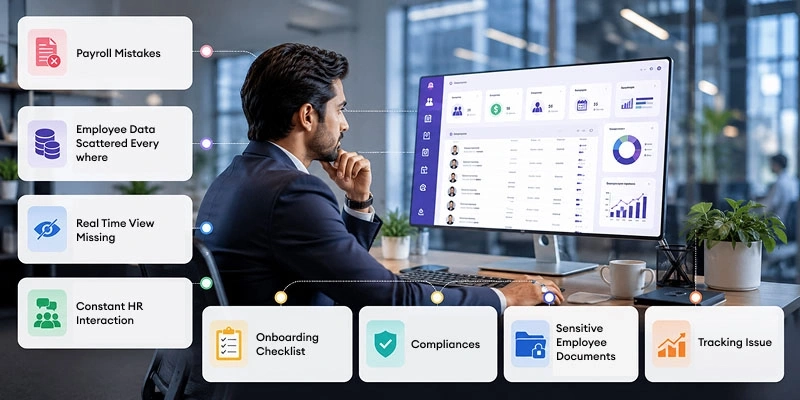
The following signs typically indicate that a business has already outgrown manual, spreadsheet-based HR management:
- Payroll Mistakes: That keep happening not every month, but often enough that “sorry, correction attached” has become a template you reuse.
- Employee Data Scattered Everywhere: contact info in one file, salary history in another, leave balances somewhere else, none of it syncing up.
- Real Time View Missing: Founders and managers have a not a real-time view into headcount or where a candidate got stuck in the pipeline three weeks ago.
- Constant HR Interaction: Employees pinging HR constantly for things they should just be able to grab themselves for a payslip, a leave balance, that old offer letter nobody can find.
- Onboarding Checklist: That’s different every single time, because it depends on who’s running it that week and whether they remembered the checklist or not.
- Compliances: In case of statutorily rules change, and if nobody’s actively tracking that, you find out about a missed filing after the penalty notice, not before.
- Sensitive Employee Documents: contracts, ID copies, tax forms, performance records — sitting in email threads or someone’s desktop folder, which means one person leaving the company is one person leaving with the only copy.
- Tracking Issue: No real sense of where the money’s going. You know payroll cost went up, but not why, or which department, or whether it’s headcount, overtime, or something you haven’t caught yet.
If two or three of these signs are present, it generally indicates that spreadsheet-based HR management is no longer sufficient for the business’s current scale.
Core Features & Modules of a Modern HRMS
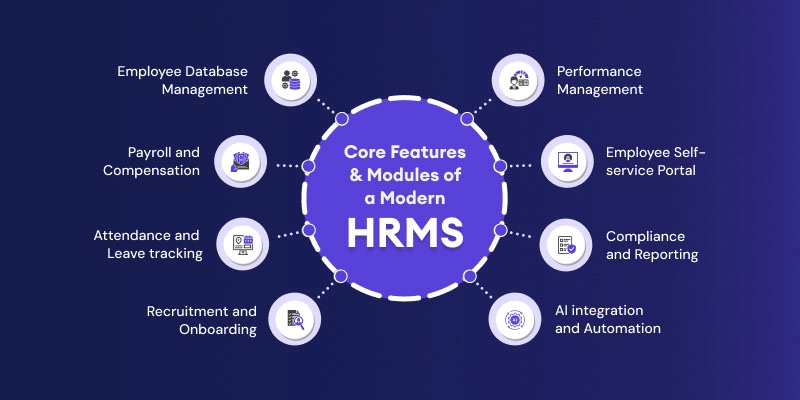
- Employee Database Management — central, secure spot for records and documents, searchable in seconds instead of buried three folders deep in someone’s laptop.
- Payroll and Compensation — salary runs, tax deductions, statutory compliance, payslips generated without anyone manually touching a formula.
- Attendance and Leave tracking — hours, shifts, and leave balances tracked in real time, with approvals that don’t get forwarded through four people before someone looks at them.
- Recruitment and Onboarding — applicant tracking and structured hiring steps in depth, with digital onboarding and e-signatures, so a new hire’s first day isn’t spent filling out the same form for two times.
- Performance Management — goal-setting and current feedback rather than an annual review where no one remembers what happened in March.
- Employee Self-service Portal — payslips, leave requests, personal detail updates, no ticket required.
- Compliance and Reporting — integrated statutory workflows and ready-to-audit reports, making sure that no important deadlines rely on individual memory.
- AI integration and Automation — the feature set that distinguishes 2026-era HRMS software from its predecessors. It includes AI-assisted resume screening, chatbots handling routine employee inquiries, and predictive alerts on attendance trends or attrition risk. These run quietly in the background, freeing HR teams to focus on strategic work instead of administrative tasks.
Benefits of Using HRMS Software
- Gives HR their time back — Instead of drowning in paperwork, HR teams get more time, more control, and a clear head to think strategically.
- Catches the mistakes humans miss — Less manual data entry means fewer payroll slip-ups and attendance mix-ups. So, the numbers you’re working with actually hold up.
- Keeps you out of legal trouble — Automated tracking of hours, taxes, and benefits means very few surprises when compliance deadlines roll around. And when audit season hits, everything’s already organized rather than scattered across folders.
- Employees stop contacting HR for basics — Payslips, certificates, training records. Staff can just log in and grab what they need themselves. No more chasing approvals or fumbling via paper timesheets either.
- Decisions backed by real numbers, not gut feel — Industry research backs this up: a 2025 analysis of HR professionals found the large majority now consider analytics essential to strategic decision-making, especially with dashboards pulling HR, finance, and ops data together in one place.
- Keeps everyone talking, in one spot — Plugging into Slack, Teams, or Zoom means conversations don’t get lost across five different apps.
- Invests in people, not just processes — Built-in training tools help spot skill gaps early and point employees toward the right learning path.
- Takes the pressure off from HR staff — When the repetitive stuff runs itself, HR teams have room to breathe rather than running on fumes.
- Grows with you, doesn’t buckle under pressure — As headcount climbs, HRMS keeps things from spiraling into chaos.
- The pattern holds across company sizes — teams that move off spreadsheets consistently report less admin time, fewer salary errors, and faster approvals that employees actually notice.
Who Uses HRMS Software?
An HRMS is rarely a single-department tool — it touches nearly every function in a business, not just HR.
- HR teams — Manage employee records, day-to-day HR operations, compliance reporting, and the full employee lifecycle.
- Payroll teams — Process salaries, tax deductions, pay cycles, and payslips (often handled directly by HR in small businesses).
- Managers and Department heads — Approve leave, track attendance, run performance reviews, and manage scheduling for their teams.
- Employees — Use self-service portals to view payslips, apply for leave, and update personal details without going through HR.
- Finance teams — Pull payroll cost reports, headcount data, and budget forecasts directly from the system.
- IT departments — Handle system integration, data security, access controls, and implementation.
- Senior management and the C-suite — Use dashboards for workforce planning, attrition trends, and organization-wide cost visibility.
- Recruiters and Talent acquisition teams — Manage job postings and candidate pipelines where recruitment modules are included.
How Much Does an HRMS Cost?
Pricing generally follows a per-employee-per-month (PEPM) model, and it scales with company size and the depth of features included. Small businesses can often start on entry-level HRMS plans for around $4 to $10 (roughly ₹380 to ₹950) per employee per month, covering core needs like employee records, attendance, and basic leave management.
Mid-market businesses, once payroll, performance management, and multi-location compliance come into play, typically pay closer to $10 to $25 (about ₹950 to ₹2,375) per employee per month. At the enterprise end, with advanced analytics, custom workflows, and dedicated support, pricing can climb to $30 to $100 (₹2,850 to ₹9,500) or more per employee per month.
Beyond the base subscription, it’s worth budgeting for setup fees, add-on modules like performance tracking or engagement surveys, and integration costs with existing payroll or accounting systems, since these often sit outside the advertised per-employee rate.
How to Select the Right HRMS for Your Business?
Finding a right or suitable HRMS is not a month’s-long project. A practical way to approach it starts by mapping your process gaps. Well, don’t go shopping for features before you know what’s genuinely broken. Separate must-haves from nice-to-haves, so you’re not paying for six modules nobody opens after month one. Check compatibility with your existing payroll/accounting software, because getting rid of that is a headache of its own.
Test it out for ease of use by a non-technical person, since it can be difficult to adopt otherwise. Confirm that it covers your necessary compliance requirements in all your operating jurisdictions, not just your HQ.
Look closely at the pricing model too; per-employee-per-month, module-based, and flat enterprise pricing play out very differently once you’re two years in and twice the size. Test how fast support responds before you buy. Not after something breaks and you’re refreshing your inbox. And ask, honestly, whether this still works once you’ve doubled.
Upcoming HRMS Trends of 2026
HR technology is ever changing. A few shifts are reshaping HRMS software this year. AI agents are handling first-pass resume screening and interview scheduling more. Predictive analytics are starting to flag attrition risk before an employee even submits a resignation letter. Continuous feedback is fully replacing annually for a review, which nobody looked forward to. Unified hire-to-retire platforms are pushing out tool sprawl — one system covering the whole employee journey instead of four apps that barely sync with each other. And employee experience has stopped being a “nice to have” line item; in a market where good people have options, it’s closer to a retention strategy than a perk.
HRMS vs HRIS vs HCM: How They are Different?
People mix these three up constantly, partly because vendors use them alternatively in marketing copy when it suits them. They’re not similar. Imagine them – as three nested circles.
- HRIS i.e. Human Resource Information System is the data layer. Records, benefits info, attendance, compliance details, all stored and reported on. It’s fine at holding information but doesn’t usually run full workflows like onboarding approvals. Works okay for a tiny team. Starts jingling once things get even slightly complicated.
- HRMS sits in the middle circle: it runs the day-to-day operational side of HR, including payroll, attendance, onboarding, leave, and performance cycles, the tasks that keep the business running week to week. It’s built for execution, not long-range strategy.
- HCM means Human Capital Management. It is the widest of the three. All HRMS does, plus the strategic layer: succession planning, talent development, workforce forecasting, predictive analytics. Lower down “do this month’s payroll,” increase “plan our workforce for the next five years.” You mostly see full HCM suites at big enterprises with dedicated people-strategy teams, not a 40-person startup.
HRIS vs HRMS vs HCM: Comparison Table
| Basis | HRIS | HRMS | HCM |
| Focus | Employee data | HR operations + payroll | Strategic workforce management |
| Best for | Small teams, basic needs | Growing/mid-size teams | Large enterprises |
| Key modules | Records, compliance | + Payroll, leave, onboarding | + Succession, L&D, analytics |
| Automation level | Low — mostly data storage and basic reporting | Moderate to high — automates payroll, attendance, and workflows | High — automation plus predictive, AI-driven insights |
| Reporting & analytics | Basic compliance and headcount reports | Operational dashboards — payroll cost, attendance trends, hiring metrics | Advanced analytics — attrition forecasting, workforce planning, ROI modelling |
| Typical users | HR admins, small business owners | HR teams, founders, department managers | HR leadership, CHROs, people-strategy teams |
| Implementation time | Days to a couple of weeks | A few weeks, relying upon the data migration | Several weeks to a few months for enterprise rollout |
| Cost range | Lowest — basic per-employee pricing | Moderate — per-employee-per-month across modules | Highest — enterprise licensing, often custom-priced |
| Scalability | Limited — outgrown quickly past a small headcount | Built to scale with growing and mid-sized teams | Built for large, multi-location, multi-entity organizations |
Most growing businesses don’t need a full HCM suite. They’d use a fifth of it and pay for the rest. What moves the needle is a solid HRMS, payroll that’s right the first time, data that lives in one place, and a lifecycle that doesn’t require five different logins just to check someone’s leave balance.
End Summary
HRMS isn’t just software sitting quietly in the background. It’s more or less the operating system for how a company treats its people. Get the basics right. Payroll that’s accurate, data that’s organized, a hiring-to-onboarding handoff that doesn’t drop the ball halfway through and HR teams get their time back for the stuff that matters. Culture. Growth. The human part of the job that spreadsheets were never built to handle.
If you’re still working out what is HRMS software your business needs, skip the temptation to pick the one with the most modules. Pick the one that fits how your team works right now and won’t buckle the moment you’re twice the size. For more details, write to us: info@niyuk.ai
FAQs
1. What does HRMS stand for?
HRMS stands for Human Resource Management System. Software that automates and centralizes core HR functions like payroll, attendance, recruitment, and performance management. Instead of juggling spreadsheets and five separate tools, everything lives in one dashboard. Most growing businesses adopt an HRMS once manual tracking starts causing payroll errors, missed deadlines, or slow support for employees.
2. What is the difference between HRMS and payroll software?
Payroll software handles salary processing and statutory deductions only — that’s its entire job. HRMS software is broader: it covers the whole employee lifecycle, including attendance, recruitment, onboarding, and performance, with payroll as just one module. Think of payroll as one feature inside a much bigger, connected HRMS system built to run all of HR smoothly.
3. Is HRMS only for large companies?
No, not even close. Plenty of HRMS platforms are built specifically for startups and small-to-mid-sized businesses that want off spreadsheets without paying for an enterprise HCM suite they’d barely touch. A lean HRMS covers payroll, attendance, and hiring without unnecessary modules, letting small teams run HR professionally on a tight budget from day one too.
4. How long does HRMS implementation take?
Cloud-based HRMS solutions can often go live within a few weeks, sometimes even days for smaller teams. HRMS implementation speed depends mainly on how much historical data needs migrating and how many modules you’re configuring at once. Larger organizations with complex payroll rules or multiple locations should expect a longer, more phased rollout process overall.
5. Is HRMS software secure?
HRMS software security depends on the vendor, but reputable providers lean on role-based access controls, encryption, and recognized compliance certifications to keep employee and payroll data protected. Look for regular security audits, data backup policies, and clear data-ownership terms before signing up. Security should never be treated as an afterthought when handling sensitive HRMS records.
6. What’s the difference between HRMS and an HR CRM or ATS?
An ATS or HR CRM focuses specifically on recruitment — sourcing, screening, and managing candidates before they’re hired. HRMS picks up right after that: onboarding, attendance, payroll, and performance for the rest of someone’s time at the company. Together, they cover the full employee journey, from first application to eventual exit or internal transfer, without gaps.