Payroll errors can happen fast than anyone can imagine. If we can think about those employees whose monthly salary is the only source of income. Let us consider their position if, by any chance, the salary gets delayed or given less than the fixed one. Such flaws can break down the overall morale of the employees and ultimately hamper the business efficiency.
While assuring for the accurate and in-time payment of salary is vital, adhering to the various laws and regulations like labour law, PF, PT and other statutory compliance is also important. Non- following these laws can attract serious legal and financial issues.
To make sure that your employees are satisfied and you are law compliant, you need to have a right understanding of what payroll is and how to run payroll powerfully. We will start with the payroll basics.
What is Payroll?

Payroll is a list of employees who are getting salary by the company. Payroll is the total amount of money employer pays to the employees.
As a business function, it covers:
- Making organization pay policy with flexible benefits, leave encashment policy, etc.
- Clearing payslip components like basic, variable pay, HRA, and LTA
- Collecting other payroll inputs (e.g., organization’s food vendor may supply details about the amount to be collected from the employees for meals taken)
- The actual calculation of gross salary, statutory as well as non-statutory deductions, and getting at the net pay
- Making employee salary
- Placing dues like TDS, PF, etc. with correct authorities and filing returns
We can say that payroll is the process of finding the net pay by calculating the taxes and standard deductions on the total salary of employees.
So, the calculation formula of Net pay = Gross income- gross deduction
Where,
Gross income / salary = All types of regular (consistent) income + allowances + any one-time payment or benefit
Gross deduction = All types of regular deductions + statutory deductions + any one-time deductions
What are the Stages to Processing Payroll?
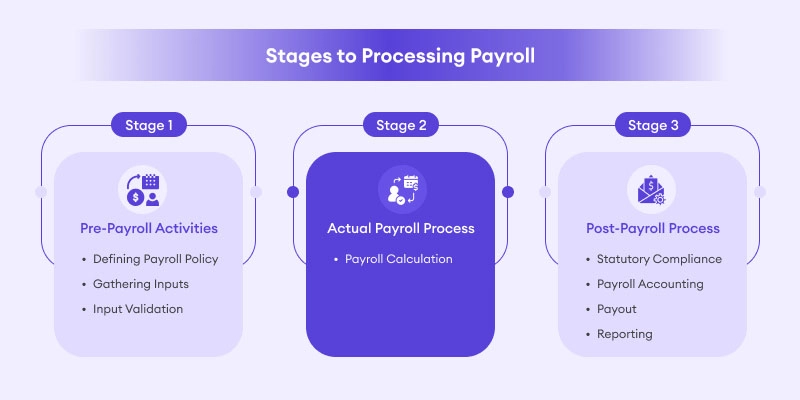
A payroll officer wants to do careful planning. There are ongoing tasks always needing attention and a constant requirement to monitor changes to withholdings, contribution to social security funds, etc. The full process can be split into 3 stages, pre-payroll, actual payroll and post payroll activities.
1.Pre-Payroll Activities
- Defining Payroll Policy
The net amount to be paid is affected by many factors. The company’s various policies like pay policy, leave and benefits policy, attendance policy, etc. come into action at that time. As an initial step, these policies need to be well explained, and management approved to ensure about standard payroll processing.
- Gathering Inputs
Payroll process includes with many departments and personnel. There can be details like middle-year salary revision data, attendance data, etc. In small companies, these inputs are received from a common source or few teams. Anyhow, in a large company, the task of gathering data may look like overburdened. If you are using an efficient payroll system having integrated features such as leave and attendance management, employee self-service portal, etc. inputs collection process does not be an issue.
- Input Validation
Once inputs are available, you need to check for data validity concerning adherence to company policy, authorization/approval matrix, right formats, etc. You are required to. Make sure that no active employee is missed and that no passive(left) employee records are added for salary payment.
2.Actual Payroll Process
- Payroll Calculation
At this stage, the validated input data is given to the payroll system for actual payroll processing. The result is the net(effective) pay after adjusting required taxes and other deductions. Once payroll process is over, it is a good practice always to reconcile the values and verify for accuracy to skip any errors.
3. Post-Payroll Process
- Statutory Compliance
All statutory deductions like EPF, TDS, ESI are done at the time of payroll processing. The company then sends the amount to the respective government agencies. The frequency can vary depending on the dues. In many cases, payment of dues is made via challans. After all dues are paid, returns/reports are filed. E.g., for filing PF return, ECR is made and filed.
- Payroll Accounting
Every organization retains a record of all its financial transactions. Salary paid is one of the remarkable operating costs which must be reported in the accounting books. As part of payroll management system, it is required to check that all salary and reimbursement data is given accurately into accounting/ERP system.
- Payout
You can give salary by cash, cheque or bank transfer. Typically, organizations offer employees with salary bank account. Once your full payroll, you need to make sure that company’s bank account has enough funds to make the salary payment. Then you must send a salary bank advice statement to the concerned branch. This statement is given with details like employee id, bank account number, number of wages, etc. If you are looking for a payroll management softwarehaving employee self-service portal, you can easily publish the payslips and employees can log-in to their account and access the payslips.
- Reporting
Once you complete payroll run for a particular month, finance and high management team may ask for reports like department wise employee cost, location wise employee cost, etc. As a payroll officer, it becomes your responsibility to search inside the data and extract much needed details and share the reports.
Statutory Compliance in Indian Payroll
When you run payroll, with statutory compliance means that you are paying as per the applicable employment norms established by the central and state legislation. The common statutory requirements applying to Indian businesses include the provision for minimum wages, payment of overtime wages to workers, TDS deduction, contribution to social security schemes like PF, ESI, etc.
While calculating salary you need to consider all these deductions and contributions. Income tax is one such deduction. At the starting of the year, the employee is asked to make a declaration about his extra incomes, tax saving investments, etc. called as ‘income tax declaration.’ Accordingly, employee’s tax liability is computed, and TDS is deducted.
Tax Slabs for FY 2017-18, 18-19, 19-20
|
Income range |
Tax rate |
Tax amount |
|
Up to Rs.2,50,000 |
– |
No tax |
|
Between Rs.5 Lakhs and Rs.10 Lakhs |
20% |
Rs. 12,500+20% of income above Rs.5 Lakhs |
|
Above 10 Lakhs |
30% |
Rs. 1,12,500+ 30% of income above Rs.10Lakhs |
Based on above tax slabs, One can calculate monthly tax liability and deduct TDS. The TDS is then deposited month wise with the government, and a quarterly report of all deductions is also filed. Once you do TDS returns for the fourth quarter, you can give form 16 to employees.
The employees use this form 16 as proof of tax deducted at the filing time of their individual income tax return.
Non-adherence with the statutory law can lead to hefty fines and penalties. That is why you need to upscale all tax and payroll statutory changes.
Challenges in Handling Payroll Management Process
The payroll process becomes challenging due to 2 main reasons. Let us break them down here one by one.
1. The Requirement to stay Statutory Compliant
As mentioned before, non-adherence to statutory laws can cause for the levy of fines and penalties and in the worst case may even pass on a threat to the existence of the business. Today there are some advanced payroll management software which automatically processes payroll in compliance with statutory laws.
2.Dependence on Multiple Payroll Inputs Sources
Before payroll can be processed, you need to get all the data together from sources like attendance register, conveyance facility, availed record, data from HR team like salary revision information, etc. creating it a complex process. For many years HR and payroll officers were organising payroll via excel sheets, but excel sheets have problems like dependency on excel formulas for salary calculation, complexity in adding and removing employees and other limitations like manual data entry, criticality in extracting information, etc.
Multiple Available Methods to Do Payroll for your Business
The possible options for running payroll can be:
- Excel based payroll management
- Payroll outsourcing
- Applying payroll software
1. Excel based Payroll Management
Many businesses who are at an initial stage of operations with a bunch of employees usually prefer for excel based payroll management.
Excel based payroll management is nothing but doing payroll calculation on excel sheets using standard payroll calculation template. The mathematical formulas are set which helps the payroll officer to do the calculation. While this method does not add any cost, but it has its default limitations like
- Difficulty in adding and removing employees from payroll list
- High chances of clerical, mathematical errors as data are manually entered
- Chances of data duplication and omission of entries time to time
- Need to track tax updates and other statutory changes like PF, PT etc
2. Payroll Outsourcing
Outsourcing payroll means you want an external agency to take care of your payroll function. Many organizations who do not have a dedicated person for payroll go for this option. Based on their pay cycle, every month they offer employee salary information and other data like attendance, leaves, reimbursement details, etc. to the payroll service provider. The service provider then calculates payroll and takes care of statutory compliance. Since payroll is a vital function and businesses want to have full clarity and control over it, they mostly do not prefer in outsourcing payroll.
3. Payroll Software
As discussed above, to run successful payroll, you need to make sure that payroll inputs are coming from each source in a timely and smooth manner. The intent of using software is to cut down the friction in getting the inputs. There is advanced payroll management software exist in the market that not just automates payroll computation but also serve as a systematic leave and attendance management, HR management and employee self-service portal. Depending on your business size and use cases you can go for a suitable payroll software for your business.
Best Payroll Software for your Organization
The shift from manual payroll system to automated one may save a lot of time. It not only helps in fast and accurate payroll processing but also keeps the employees, management and regulatory bodies satisfied.
There are some features that you should consider for the selection of a payroll management software.
1.Ease of Operation
Payroll function can be very cumbersome. You should opt for a system which has complete but straightforward workflows. If the software is intuitive, it lowers the need for software training and guidance. Also, make sure that the software provider is providing well-updated documentation so that you can access the information anytime as you may need.
2.Scalability
As organization size increases your software need to serve you accordingly. The limitation can be in terms of employee’s data. It processes or in terms of the available features like leave and attendance management, reimbursement model, etc. The software offerings must be like that you can use advanced features at a reasonable price without much challenge.
3.Employee Self-Service Module (ESS)
One of the primary payroll data input providers is the employee. He offers information like income tax saving investment declaration, type of flexible benefit opted, etc. The communication between the payroll officer and employee is normally very incident based. To understand the importance of ESS module, we can assume a case of income tax declaration in two scenarios:
|
Without ESS at Year Start |
With ESS at Year Start |
|
Income tax Declaration Forms |
One Button Release of IT Declaration form Payroll staff pushes IT form via software and employees gets notifications |
|
Submission of Physical Forms |
Paper less, Online Submission All employees’ login in ESS, fill up and submit IT forms online in the system |
|
Collection of Forms and Manual data entry |
Auto-sync with payroll data The data enters ESS and updates payroll database and payroll data gets updated automatically |
|
Manual entry of IT details of employees In payroll software system brings in lots of errors |
Rapid and error-free IT declarations and payroll database updations |
So, ESS can automate payroll database updation, helpful for easy and accurate tax calculations.
4.Incorporation with Time, Attendance and Leave Management System
Time Management
Typically, this module is used to track time spent on projects or certain activities. Consulting firms like audit firms, specialist doctors, etc., who manage tough projects require a powerful time management module for time tracking and at times this data can be used for billing clients also.
Attendance
While many small companies prefer manual attendance system, medium and large companies have started using efficient automated tools like biometric method, auto-tracking through system log-in, access cards, iris capture, etc. The data is placed in a system and linked to the payroll software using this data to calculate attendance days, overtime, etc. For smooth payroll processing, check that software helps attendance management and is configuring with access control machines.
LeaveManagement
In each organization, employees are eligible to take a specific number of leaves like privilege or annual leave, casual leave, sick leave, holiday, etc.
If the software has leave management feature, HR can directly credit these leaves to the account of each eligible employee. As and when required, the employee can apply for leave via the system. A good system must be able to define a workflow to notify the manager for either approval or rejection. A powerful payroll leave software with built-in leave management feature may help to attain accurate payroll.
Integrationwith the Accounting System
Your accounting / ERP system requires to record each financial transaction with payroll information like department wise employee cost, individual payroll things like reimbursements, tax -due and paid, etc. Some payroll solutions have integration with accounting software via API (a way to push data directly from one software to another).
Without such integration, the payroll officer needs to give all transaction details to accounts department. The accountant then manually posts it in the form of journal entries in accounting/ERP software like Tally ERP, SAP, QuickBooks, etc. These integrations may help finance and payroll team to work together and avoid any manual data entry.
- Cloud-Based Software over On-Premises Solutions
The payroll management automation arena is rapidly transforming. The on-premises software solutions have become outdated, and businesses are preferring cloud-based solutions due to their advantages.
- Ability to Access the Data at Any Time and From Anywhere
If you use a cloud software, you can access your payroll data and employee data, also from any remote location. You can login from any location at any time like Gmail and access them.
Payroll Automation Features in Niyuk.AI
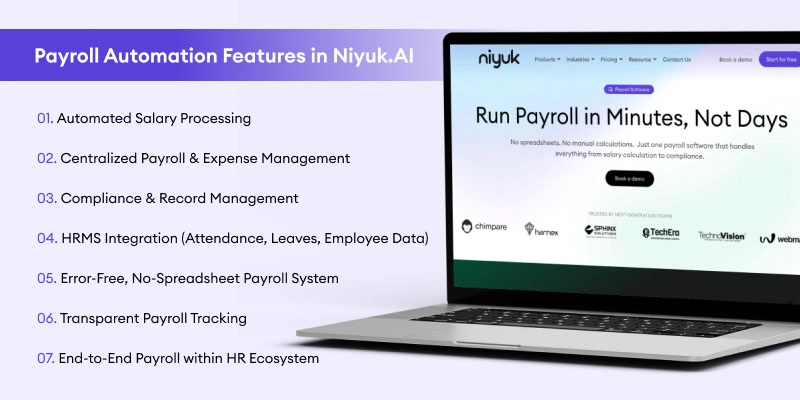
1. Automated Salary Processing
What it does:
With payroll automation in Niyuk.AI, the complete salary cycle from calculations to final payouts is handled automatically. No spreadsheets, no manual role, no last-minute rush.
Why it’s useful:
- Eliminates manual calculation errors mostly happen in conventional payroll
- Saves valuable HR hours each single month
- Makes sure for accurate and on time payment of employees
2. Centralized Payroll & Expense Management
What it does: Niyuk acts as a full payroll management system, bringing payroll, reimbursements, and employee expenses into a single dashboard.
Why it’s useful:
- No more clumsy Excel sheets or disconnected tools
- Offers a clear view of total employee costs in one place
- Streamlines audits and financial tracking
This kind of HR payroll software keeps finance and HR perfectly synced, without regular follow-ups.
3. Compliance & Record Management
What it does:
The platform retains structured payroll records and makes sure that all processes follow needed statutory and compliance norms.
Why it’s useful:
- Reduces the penalties risk and compliance errors
- Always keeps audit-ready documentation
- Automatically adapts to regulatory requirements
For growing businesses, AI payroll software like Niyuk the stress of keeping up with evolving regulations.
4.HRMS Integration (Attendance, Leaves, Employee Data)
What it does:
Niyuk connects payroll with attendance, leave management, and employee records creating a complete integrated payroll automation system.
Why it’s useful:
- Salaries are calculated based on real-time attendance and leave data
- No need for manual data entry from many tools
- Ensures high accuracy in payouts
For example, if employee takes leave, the automated payroll system adjusts the salary (according to the type of leave and balance etc.) promptly. No manual corrections required.
5. Error-Free, No-Spreadsheet Payroll System
What it does:
Niyuk replaces old Excel-based processes with a reliable AI-driven payroll automation engine.
Why it’s useful:
- Eliminates dependency on error-prone spreadsheets
- Reduces human mistakes in calculations
- Maintains consistent payroll processing each month
This shift to a modern payroll management system is one of the biggest efficiency upgrades for HR teams.
6. Transparent Payroll Tracking
What it does:
The system keeps payroll records clear, structured, planned and easily accessible for employees and HR.
Why it’s useful:
- Employees may easily understand their salary breakdown
- HR teams can track payroll history rapidly
- Reduces confusion and salary-related queries
Transparency via payroll automation builds trust and remarkably reduces HR workload.
7. End-to-End Payroll within HR Ecosystem
What it does:
Niyuk is not just a payroll tool. It’s a complete HR payroll software connecting payroll with hiring, performance, and employee management.
Why it’s useful:
- Everything is organised on a single platform
- Data flows smoothly across the employee lifecycle
- Allows smart, data-driven decisions
For example, combining performance insights with payroll helps in preparing fair and structured salary increments.
Overall Benefits of Niyuk Payroll Automation
- Massive Time Savings
Payroll automation, repetitive tasks are automatically handled, allowing HR teams to focus on hiring, engagement, and strategy.
- Higher Accuracy
An automated payroll system drops calculation errors which are common in manual processes.
- Better Compliance
Built-in compliance features in AI payroll software makes sure for all payroll activities to meet the legal requirements without constant monitoring.
- EnrichedEmployee Experience
Timely salaries, clear payslips, and few errors create a smooth and more reliable employee experience.
- Scalability
As your team grows, a strong payroll management system scales easily without increasing HR workload.
Conclusion
The on-premises systems have their limitations like danger of data loss by fire, flood, etc. Also, the installation cost of these systems is massive and comes with an initial operational limit. Mostly, the annual maintenance cost is very high. On the other hand, the cloud solutions are built on such technology, so you can always start for an upgraded plan supporting high level of operations at any time.
Since cloud solutions have data centre at various locations, also during incidences of fire, flood, etc. your data remains safe and secured.
For such more payroll features and a complete software system, you can connect with Niyuk Team on:
payroll management system
Say no to spreadsheets and payroll errors
Switch to A Smart Way of WorkingFrequently Asked Questions
Q: What is payroll management and why is it important?
A: Payroll management is the process of calculating employee salaries, managing deductions, and ensuring timely payments. It is important because it keeps businesses compliant, ensures employees are paid accurately, and builds trust. A strong payroll management system also reduces errors and saves time for HR teams.
Q: How does payroll automation improve business efficiency?
A: Payroll automation simplifies salary processing by eliminating manual calculations and repetitive tasks. An automated payroll system ensures accuracy, speeds up processing time, and reduces dependency on spreadsheets. This allows HR teams to focus more on strategic work instead of routine payroll tasks.
Q: What features should a good payroll management system have?
A: A reliable HR payroll software should include salary automation, tax and compliance handling, attendance integration, payslip generation, and reporting. Modern AI payroll software also offers real-time insights, error detection, and seamless integration with HR systems.
Q: Is payroll software suitable for small businesses?
A: Yes, payroll software for small businesses is highly beneficial. It reduces manual work, ensures compliance, and scales as the business grows. Even small teams can benefit from payroll automation by saving time, minimizing errors, and maintaining accurate salary records.