A ranked list of software vendors. A feature comparison. A pricing table. What you are less likely to find is an answer to a much simpler question: what does an actual HRMS implementation look like?
This blog article aims to remedy that by providing 10 illustrative cases of using various hrms software in use. All these examples are based on realistic scenarios typical for companies of different sizes and industries. Each case follows the same structure: the company’s industry and size, the problem that triggered the software adoption, the solution, and the result.
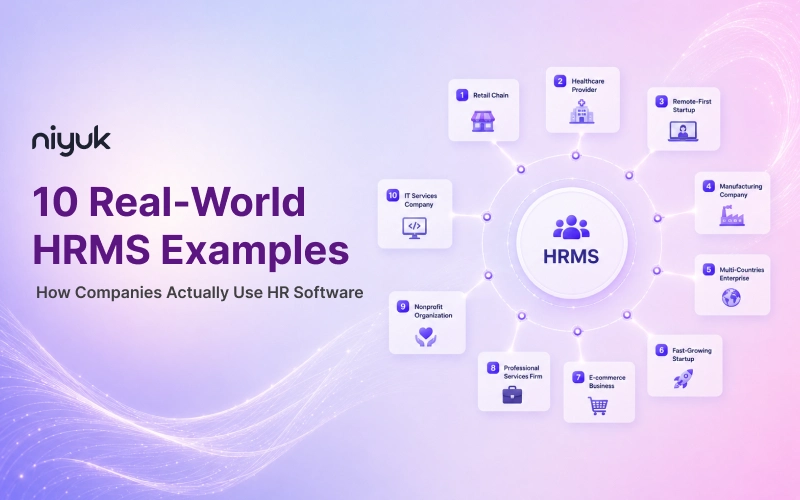
10 Real-World HRMS Examples
These examples cover a range of industries and company sizes, so you can match yours with the most suitable one.
1. Retail Chain: Managing Multi-Location Staff with HRMS
A retail chain with thirty to fifty stores is likely to face a significant challenge related to maintaining an efficient schedule and tracking employees’ attendance and payroll. Before HRMS implementation, store managers used to plan their own work schedules on paper or in Excel sheets, which frequently led to errors during payroll preparation and inconsistent coverage.
After HRMS software is introduced, store managers rely on a shared scheduling and attendance module and apply the same data when calculating payroll, removing inconsistencies and saving time on monthly reporting that used to be done manually.
Also, any changes to the schedule, sick leave, or overtime are reflected in the payroll calculations to make sure that there are no discrepancies.
2. Healthcare Provider: Simplifying Compliance and Shift Scheduling
Healthcare organizations operate under highly regulated shift patterns and must comply with several requirements, among which are tracking staff credentials and mandatory rest hours between shifts. Tracking credentials on an ongoing basis is a common challenge, as one missed recertification can result in a substantial compliance risk.
An HRMS with credential tracking features would automatically highlight expiring credentials and prevent scheduling mistakes that could raise compliance issues. This would reduce manual checks of staff eligibility for shifts by scheduling personnel, as they would be able to see in real time who is eligible to work a specific shift, based on their current credentials.
3. Remote-First Startup: Running Global Payroll Through HRMS
A remote-first company that hires people from at least five countries will quickly realize that they need something more robust than what typical single-country solutions offer in terms of payroll and compliance. There are always nuances specific to each country that have to do with benefits, taxes, legal requirements, etc., which typically means consulting with local experts in these countries anyway.
While HRMS solutions aim to simplify multinational payroll processes by providing an end-to-end platform that covers all aspects of paying employees while taking care of statutory requirements in each country they operate in, using such software reduces costs since there is less need for external consultancy at the local level, as everything can be managed through one dashboard.
4. Manufacturing Company: Automating Attendance and Shift Payroll
Traditional time clocks or sign-in sheets for work scheduling businesses with hourly and shift-based employees may create numerous inaccuracies and provide ample opportunities for time theft. Calculating pay-differentials, overtime, and union-specific adjustments manually can also be a time-consuming and error-prone process.
An HRMS with biometric or badge scanners as its attendance component, however, can automate this process by importing information directly into payroll, calculating shift differentials, and eliminating much of the potential for human error.
5. Multi-Countries Enterprise: Centralizing HR Across Borders
Larger enterprises operating in ten or more countries face the same challenge to many distributed startups do. The need is to standardize global processes while supporting local labour laws and regulations still. In practice, this means that HR teams in many countries must navigate many different HR systems. This makes it tough for leadership to get an accurate picture of the workforce at any given time.
An enterprise-level HRMS may provide multinational firms with a single solution compatible with all local regulations. At the corporate level, it offers complete control and insight into the state of the workforce, while at the local level, it supports workers’ productivity by not disrupting their daily operations.
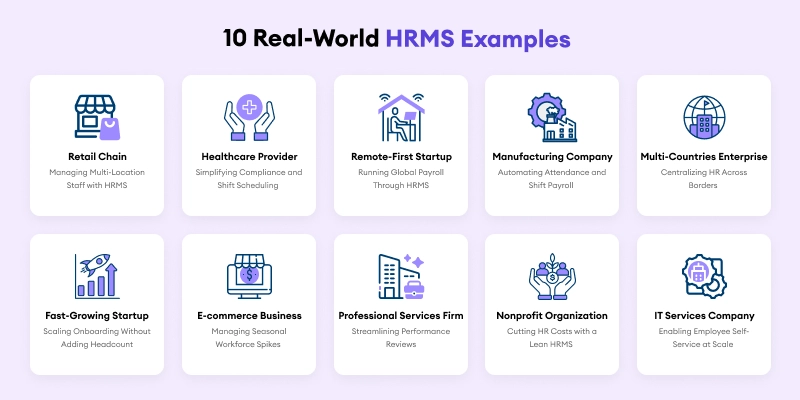
6. Fast-Growing Startup: Scaling Onboarding Without Adding Headcount
A start-up company that grows quickly, hiring ten to twenty new workers each month, will soon outgrow manual onboarding. Getting offers to new employees, gathering required papers, and making new workers productive by hand is a process that will slow any business that grows rapidly.
HRMS onboarding keeps track of all the documents needed, ensures they are electronically signed, and manages the tasks assigned to new workers during their first week on the job. This allows new workers to be placed correctly in a job without extra hours for the human resources department. This means a small team can keep up with a growing company without adding headcount at the same rate.
7. E-commerce Business: Managing Seasonal Workforce Spikes
E-commerce companies often hire large numbers of seasonal or temporary workers to meet demand and then must lay them off when the peak season is over. The process of manually entering and removing dozens of temporary workers is time-consuming and burdensome.
An HRMS (Human Resource Management System) would allow the hiring and laying-off process of seasonal/temporary staff to be much more efficient. It can help HR departments bring on thousands of seasonal temps with ease, and then automatically complete necessary off-boarding and paperwork to finalize their pay checks.
8. Professional Services Firm: Streamlining Performance Reviews
Professional services firms, such as consulting or agency businesses, tend to have structured approaches to performance reviews, which are often dictated by client-centered outcomes and career development paths. The management of performance appraisal data, particularly using tools such as spreadsheets and email, can be challenging, especially when it comes to consistency and standardization across the firm.
The performance management module in HRMS helps organizations standardize performance reviews and appraisal practices by providing a common framework for setting goals, tracking progress, and collecting feedback. It enables managers to stay on the same page while also providing the human resource department with a centralized repository for assessing performance data to inform compensation and promotions.
9. Nonprofit Organization: Cutting HR Costs with a Lean HRMS
Nonprofits usually have small HR teams and limited budgets, but there is still a need to track payroll, ensure compliance, and keep staff and volunteer records organized. An enterprise-level human resource management system (HRMS) is too expensive, but a manual process is error-prone for the small HR team to manage. A lightweight, low-cost HRMS solution that addresses the most critical needs of payroll, attendance tracking, and record management will allow the small team to automate the most critical processes while maintaining compliance. This way, two or three people in the HR department can be sufficient to support a much larger number of employees.
10. IT Services Company: Enabling Employee Self-Service at Scale
IT services companies with geographically widespread technical workforces have an increasing number of employee requests, such as those for payslip verification, leave balance clarification, address changes, and similar queries, which are time-consuming for HR to process and do little to utilize workers’ critical thinking capabilities.
An employee self-service portal for the human resource management system (HRMS) would allow staff members to resolve such issues without involving HR by responding to the automated requests directly in the portal, thus reducing the number of low-level support tickets.
HRMS Features and Modules Behind above Examples
From the ten examples above, a small set of cores HRMS features keep showing up:
| Feature/Module | What It Does | Seen In |
| Payroll automation | Combines attendance and shift data directly into pay calculations | Retail, manufacturing, remote-first examples |
| Compliance and credential tracking | Flags expiring certifications or statutory requirements on its own | Healthcare, multi-country enterprise examples |
| Onboarding and offboarding workflows | Automates document collection and task assignment | Startup, e-commerce examples |
| Performance management | Standardizes review cycles and feedback | Professional services example |
| Employee self-service | Allow staff to handle routine requests without contacting HR | IT services example |
These are the core HRMS modules around which many HRMS platforms are built, though the right blend for any given company depends on its industry and size.
Types of HRMS Used in These Examples
The examples above fall under a few broad types of HRMS:
| HRMS Type | What It Covers | Best Suited For |
| Core HR platforms | Payroll, attendance, and basic records | Small or budget-sensitive organizations, like the nonprofit example |
| Full-suite HRMS platforms | Payroll, performance, onboarding, and analytics together | Mid-sized and growing companies, like the startup and retail examples |
| Enterprise or global HRMS platforms | Multi-country compliance and large-scale workforce analytics | Large or distributed organizations, like the multi-country enterprise and remote-first examples |
HRMS Software Benefits Shown in above Examples
The hrms software benefits running through these examples are concrete rather than abstract:
- Some payroll errors, since attendance and pay calculations connect automatically rather than being reconciled by hand.
- Lower compliance risk, since credential and statutory tracking happens without someone monitoring it manually.
- Faster onboarding at scale, without a matching rise in HR headcount.
- Less repetitive workload for HR teams, since employee self-service absorbs routine requests.
- Better visibility for leadership, since workforce data lives in one system instead of scattered regional tools.
These are the same advantages of hrms that show up consistently across company size and industry, even when the specific problem each company faced looked quite different.
What HRMS Implementation Looks Like in Practice
As per the examples above, HRMS implementation tends to follow a similar path irrespective of industry. Employee data gets migrated from spreadsheets or a legacy system into the new platform first. Payroll and attendance rules get configured to match the company’s specific pay structure and shift patterns. Managers and employees then get a short onboarding period to learn the self-service features before the system fully takes over from the old manual process.
Most companies notice time savings within the first payroll cycle or two, though full adoption across every module, including performance management or advanced analytics, usually takes a few months longer to settle in.
Selecting the Right HRMS Example for Your Business
Use your company size and biggest pain point to find the closest match among the examples above.
- If payroll accuracy across multiple locations is the main issue, the retail chain example is the closest match.
- If compliance risk is the bigger concern, the healthcare compliance examples apply most directly.
- If you are scaling headcount quickly, the fast-growing startup example fits best.
- If you have operations in more than one country, the remote-first startup or multi-country enterprise examples apply
- If you are on a tight budget, the nonprofit example should help you see what a lean HRMS setup could look like.
Conclusion
In this blog article, one can easily find ten different industries, ten different problems, one pattern that keeps repeating the fact that, the companies that got real value from HRMS weren’t chasing the platform with the most or optimum features.
They were solving one specific, recurring headache, payroll accuracy, compliance risk, onboarding speed, and allowing that decide what mattered.
That’s the real takeaway from these HRMS examples. The best HRMS for you isn’t the one with the long lasting feature list. It’s the one that fixes the problem that’s actually costing you time and money right now.
FAQs
1.What Is an HRMS Example?
An HRMS example reflects how a specific company or industry uses HR software to solve a real HR problem. It also includes what changed as a result. It is a bit different from a list of software vendors.
2.How Is an HRMS Example Different from an HRIS Example?
An HRIS example usually centres on resolving a data storage or record-keeping problem. An HRMS example normally centres on solving a process problem, like automation of payroll, onboarding, or performance management.
3.Which Industries Use HRMS the Most?
Retail, healthcare, manufacturing, IT services, and remote-first companies are among the heaviest users of HRMS, largely because each one deals with a specific, recurring HR problem that manual processes handle poorly at scale.
4.What modules does a typical HRMS include?
Most HRMS platforms include employee records, payroll, time and attendance, leave management, onboarding, recruitment, performance management, and reporting/analytics. Advanced platforms add compliance tracking, multiple-country payroll, and AI-driven analytics.
5.How does an HRMS help small businesses?
For small businesses, an HRMS reduces manual admin work, automating payroll calculations, tracking leave balances, and centralizes employee records. So, a lean HR team (or a single HR generalist) may manage the same workload without hiring additional or extra support staff.
6.Do all companies need every HRMS module?
Not exactly. Most companies start with core modules (payroll, attendance, leave) and add modules like recruitment, performance management, or AI analytics as they grow. Paying only for what their current headcount and complexity require.