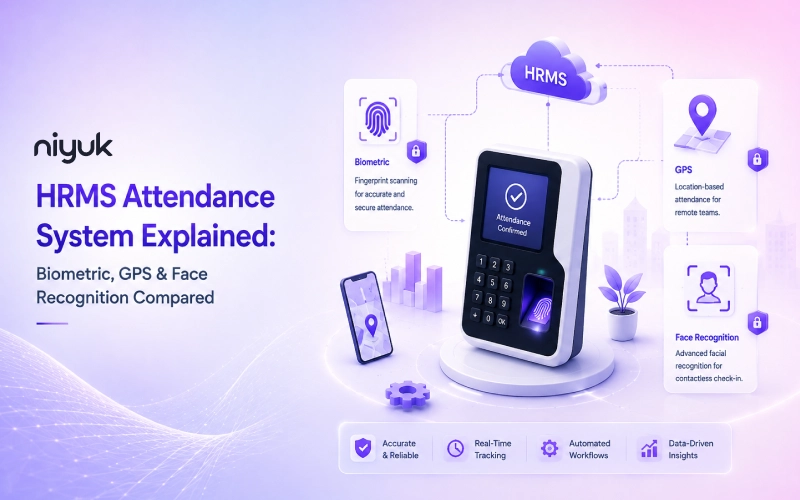
There’s no such thing as one “HRMS attendance system” for each workplace. One can ask five HR managers what matters most, and you’ll hear five different answers because each of them is looking at attendance from a different angle. The real question isn’t which approach wins the argument, but which one solves the problem you have. For an office manager, that could simply mean a reliable system at the entrance that makes buddy punching and attendance manipulation difficult.
A field ops lead doesn’t have a door to worry about. What they need is proof someone was where they said they were when they clocked in. Both needs are legitimate. Which is really the whole point, biometric vs GPS vs face recognition was never a contest with a single winner. It’s three tools built for three different jobs.
So that’s what this covers, honestly and in order. What each method does, where it quietly breaks down in practice, what it costs, and which one fits your team. None of the three wins everywhere, so instead of pushing one, this lays out the real trade-offs so you can match the tool to your situation rather than force your situation to fit whatever tool you picked first.
What Is an HRMS Attendance System?
An HRMS attendance system is the piece of your HR software that logs when people start and stop working, through biometric scanning, face recognition, or GPS location, and then feeds that straight into payroll and compliance reporting without anyone touching it. It’s the thing that finally replaces the manual register, the punch card, the spreadsheet somebody’s supposed to update every Friday and usually forgets.
Why Attendance Tracking Matters for Growing Companies
At ten people, attendance tracking isn’t really a system. It’s just somebody remembering who came in. Fine, works okay. At a hundred people across two shifts, that same casual approach starts breaking things: payroll errors, disputed hours, HR spending an entire morning trying to piece together who was there the day before.
An attendance management system takes the guesswork out entirely. The record is created the moment an employee clocks in, tied to either a real person or a real place, not a name written down after the fact by someone who might not remember it correctly.
This difference has far-reaching implications for how much time is wasted dealing with payroll issues and corrections, which are far more prevalent than most managers would care to admit.
Types of HRMS Attendance Systems
There are three basic approaches that are dominant in the market today. Typically, growing companies adopt more than one approach. Not necessarily due to management indecision, but rather because different segments of the workforce have varying needs.
1. Biometric (Fingerprint) Attendance
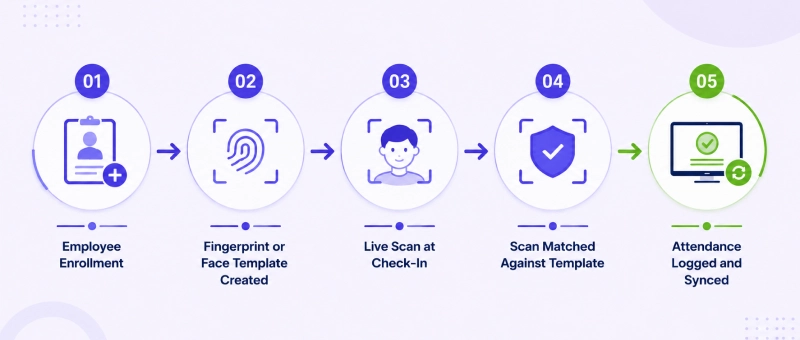
A biometric attendance system uses a physical attribute, usually a fingerprint, to verify the identity of an individual at a specific terminal. The fingerprint is scanned and compared to a stored fingerprint template to grant access and record the time.
What’s happening underneath is worth knowing. Enrolment captures the fingerprint and turns it into a mathematical template, not a photo of your finger sitting in a database somewhere. Every check-in after that compares a fresh scan against that stored template, and a match logs the event.
The real strength here is that you can’t hand off a fingerprint the way you’d hand off an ID badge. Buddy punching, one person clocking in for someone else, becomes nearly impossible. That’s why fingerprint attendance system setups still show up constantly in factories and offices where everyone walks through the same door every single day.
The honest limitation: scanners hate dirty, wet, or worn fingers, and that’s a daily reality on a factory floor or a construction site, not some edge case.
A cloud based biometric attendance system can sync data the instant a scan succeeds, sure, but syncing fast doesn’t help when the sensor won’t read a calloused hand in the first place. Test it under your actual working conditions. Not a spotless demo room.
2. Face Recognition Attendance
A face recognition attendance system trades the sensor for a camera. Employee looks at the device, the system checks their face against an enrolled profile, attendance logs on its own, nobody touches anything.
This genuinely pays off at high-traffic entry points, hospitals, factory floors where hundreds of people show up in a tight window, anywhere hygiene matters or a queue is becoming a real problem. A face recognition time attendance system typically clears a crowd faster than a fingerprint scanner processing people one at a time, which adds up fast at shift change.
The catch is lighting and angle, mostly. Bad lighting, a mask, an awkward camera position, any of it can cause a failed match. Most decent systems now include liveness detection, essentially a check that confirms a real person is standing there and not someone holding a photo up to the lens, but how well that anti-spoofing works differs a lot from vendor to vendor. A cheap face recognition attendance app and an enterprise-grade one are not the same thing wearing different logos.
3. GPS-Based Attendance
GPS based attendance system setups run on completely different logic. They don’t try to confirm who you are, they confirm where you are. Employee opens the app, the system checks their location against a set boundary, usually called a geofence, before logging anything.
This is really the only method built for people who don’t have one fixed spot to be at. Field sales, delivery drivers, remote staff, anyone bouncing between sites, they all hit the same wall: there’s no single door to bolt a scanner onto. GPS gets around that by turning the phone itself into the check-in point, wherever the person happens to be.
Most serious platforms pair GPS with a selfie or face check, and there’s a good reason for that. Location alone doesn’t prove identity, it just proves a phone was somewhere. Put the two together and the gap closes. GPS handles where; face recognition handles who. Also worth knowing, GPS accuracy can drift indoors or in dense city blocks.
Side-by-Side Comparison : Biometric vs Face Recognition vs GPS
| Factor | Biometric (Fingerprint) | Face Recognition | GPS-Based |
| Hardware required | Dedicated fingerprint device | Camera or smartphone | Smartphone only |
| Best suited for | Fixed office or factory location | High-traffic entry points, hygiene-sensitive settings | Field, remote, or multi-site staff |
| Buddy punching risk | Very low | Very low, with liveness detection | Moderate, needs identity check paired in |
| Common failure point | Dirty, wet, or worn fingers | Poor lighting, masks, angle | Indoor GPS accuracy, spoofing apps |
| Typical setup cost | Moderate to high (hardware per location) | Moderate (camera or existing smartphones) | Low (uses existing devices) |
| Works for remote staff | No | Only if smartphone-based | Yes, built for this |
| Contactless | No | Yes | Yes |
Which Attendance System Is Right for Your Business?
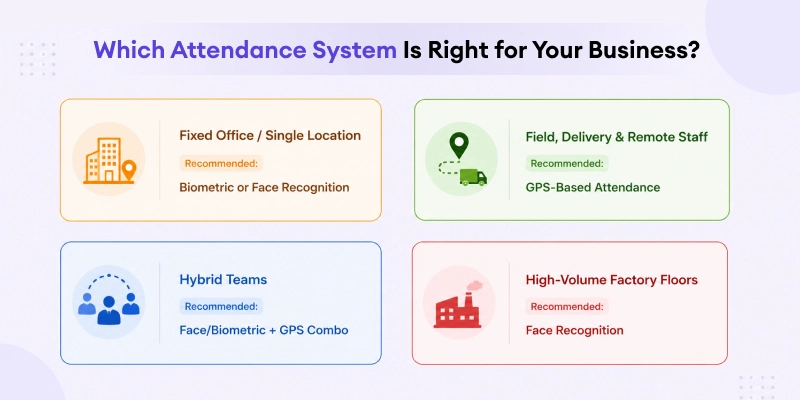
Just look at where your people spend their day.
- Fixed office or single-location teams generally do fine with biometric or face recognition right at the entrance. Everyone’s walking through the same door regardless, and a device-based setup doesn’t lean on anyone’s personal phone at all.
- Field sales, delivery, or multi-site staff need GPS. There’s no getting around it. No fixed entry point means no scanner to attach anything to, and trying to force biometric onto a mobile workforce usually just means the system gets quietly abandoned within a month.
- Hybrid teams typically need both, honestly. Face recognition or biometric on office days, GPS on remote or client-site days. It’s less a compromise, more just matching the tool to how the work plays out day to day.
- High-volume factory floors tend to favour face recognition specifically, since it clears a crowd faster than a fingerprint scanner working through people one at a time, and shift changes are exactly when a few hundred people need to check in inside a narrow window.
Cloud-Based vs On-Premises Attendance Systems
This is a separate call from which capture method you go with, and it cuts across biometric, face recognition, and GPS equally.
On-premises systems store attendance data on private servers or devices. They offer administrative control of the infrastructure, which some highly regulated industries need. That control comes at a cost, though: organizations must manage and maintain the software and hardware themselves, and that gets expensive faster at enterprise scale.
Cloud-based systems sync everything to a hosted platform reachable from anywhere. This is the more common pick today, for a straightforward reason: it scales without buying more hardware, and honestly, it’s the only workable option for GPS attendance, since there’s no on-premises version of tracking someone at a client site three states away.
For most growing companies, a cloud based biometric attendance system, or the face recognition equivalent, delivers real-time visibility that on-premises setups just can’t touch without a much bigger investment behind them.
Compliance & Security Considerations
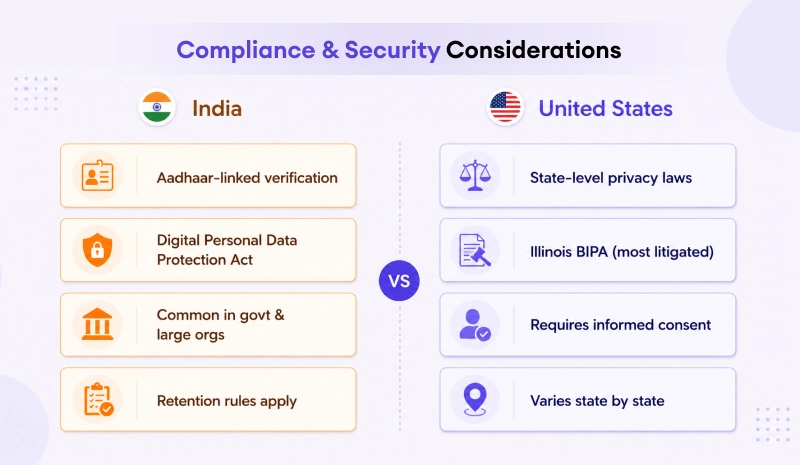
Biometric and location data are both genuinely sensitive, and the rules around them look different depending on whether you’re operating in India or the US.
In India, biometric attendance increasingly ties into Aadhaar for identity verification, especially across government bodies and larger organizations. An Aadhaar enabled biometric attendance system cross-checks fingerprint or iris data against India’s national identity database, adding one more layer of verification on top. Beyond Aadhaar specifically, India’s Digital Personal Data Protection Act sets real requirements for how biometric data gets collected, stored, and retained, so any vendor on your shortlist should be able to walk you through their compliance posture clearly, not just point vaguely at a policy page and move on.
In the US, plenty of states have their own biometric privacy laws on the books, Illinois’ Biometric Information Privacy Act being the best known, and frankly, the one that’s ended up in court the most. These laws generally demand informed consent before collecting biometric data, clear disclosure of retention periods, and specific rules about sharing data with third parties. Operating across several US states? Check each state’s requirements individually. Don’t assume one national standard has you covered, because it doesn’t.
Whatever method you land on, ask vendors directly: is biometric data stored as a raw image or an encrypted template, who can actually access it, how long does it stick around, and what happens to it the moment an employee leaves. A vendor who can’t answer that plainly is a real warning sign, no matter how smooth the demo looked an hour earlier.
Conclusion
There’s no single best HRMS attendance system out there, just the one that fits how your people work. Fixed teams do well with biometric or face recognition at the door. Field and remote staff need GPS, that part isn’t up for debate. Most growing companies end up running a mix of the two, and that’s not indecision, it’s just an honest read on a workforce that doesn’t fit neatly into one box. Whatever combination you settle on, the method itself matters less than getting the payroll integration and compliance basics right underneath it.
Frequently Asked Questions
1.What’s the difference between biometric, GPS and face recognition attendance?
Biometric counts on fingerprints, face recognition works off your facial features via a camera and some AI matching. GPS attendance tracks where you were (your exact location) and when you checked in. Biometric and face recognition confirm identity at stationed location GPS assures location for moving people.
2.Which is most accurate – fingerprint attendance or face recognition?
This is fully dependent upon your location in the system. In a factory, for the instance, complete-body scanners are said to have difficult watching via wet skin, dusty, oily, or non-compliant fingers. Face recognition can fail in bad light, with a mask, or if the camera is at a strange angle. Inside, fingerprints usually work better because there are few problems.
3.Is GPS attendance suitable for remote or field employees?
Yes, honestly this is exactly what it was built for. A GPS attendance app fits field sales, delivery, or remote teams well since it confirms location at check-in without any hardware like a biometric scanner involved. Most platforms tack on a selfie check too, since location alone can’t prove who’s holding the phone.
4.Can biometric attendance data integrate with payroll?
It can, and honestly, it should. A properly connected biometric attendance system with payroll software feeds hours, overtime, and deductions straight into salary calculations, no manual re-entry needed anywhere. This alone knocks out one of the biggest sources of payroll errors, since attendance and payroll are pulling from the same record instead of two that can quietly disagree.
5.Is biometric attendance data safe and compliant?
Reputable platforms encrypt biometric data and keep it locked down, aligned with rules like India’s DPDP Act or US state laws such as Illinois’ BIPA. That said, don’t just take a vendor’s word for it. Besides what a vendor might tell you, it’s worth asking about how long employee records are kept on file and, just as importantly, what happens to the data when an employee leaves the organization.
6. What is contactless attendance and why does it matter?
No fingerprint scanner, no physical touch at all, that’s the idea behind a contactless attendance system. It runs on GPS or facial recognition instead. This earns its keep most at busy entry points, hospitals, factories, anywhere a crowd needs to check in fast. Fewer touchpoints, faster line movement, nobody standing around waiting.
7. Do small businesses need biometric attendance systems?
Yes. They can help, mostly by cutting down on buddy punching and the small errors that creep in with a short-staffed team. It means plenty of small businesses avoid the hardware entirely and go with cloud-based or mobile biometric attendance software rather, dodging the upfront device cost while keeping most of the upside.
8. What is an Aadhaar-enabled biometric attendance system?
Basically, one extra layer stacked on top of a normal biometric check. An Aadhaar enabled biometric attendance system verifies employee identity against India’s Aadhaar database, apart from the usual fingerprint or iris scan. You’ll mostly find this in government offices and big organizations, where compliance and audit requirements are very much necessary than average.
9.Which attendance system is best for a hybrid workforce?
In most cases, a combination of methods works better. For employees who divide their time between the office and remote or client-site locations, facial recognition or biometric scanners can manage office attendance, while GPS-based mobile attendance can record check-ins when they’re working away from the office. Running both together, rather than stretching one method to cover everything, just matches how hybrid teams operate.