In today’s AI era, AI in HR is a trend-setting technological boom. As one of the fastest rising economies in the world, India is experiencing an enhanced HRMS market in the present time.
One must consider that every HRMS software platform has different features to offer. Various platforms offer 5-6 basic modules and present them as a complete solution, so, ultimately, one still needs to manage many HR functions manually. Getting your HR software features selection right from the start saves remarkable rework later.
This blog article shines a light on essential HRMS features which each Indian business must check before investing.
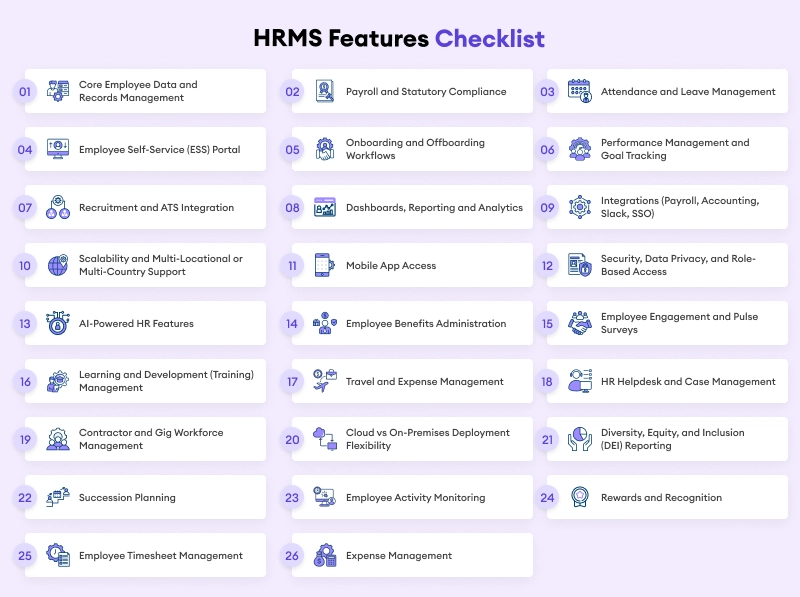
HRMS Features Checklist
This is the core checklist, with must-have features worth assessing in any serious hrms features list, regardless of vendor. Together, these make up the core hr management software features every buyer should check.
1. Core Employee Data and Records Management
Each HRMS starts with a centralized employee database, holding personal details, job history, documents, and org structure in one place. Nothing else on this HRMS features list works without it. Payroll and compliance modules pull directly from these records, so if the records are messy, everything built on top of them inherits that mess.
2. Payroll and Statutory Compliance
Payroll software features must cover automated salary calculation, deductions, and statutory compliances specific to your region, PF, ESI, and TDS in India, or state-level payroll tax in the US. This is consistently the very sensitive hr and payroll software features category, since errors here directly affect employee trust and legal exposure. A platform that treats payroll as a secondary priority is not a serious HRMS. This is really where the hr payroll software conversation matters most.
3. Attendance and Leave Management
A robust attendance module would comprise biometric or geo-tagged attendance, configurable leaves, and approvals synced with payroll. Attendance capture has multiple dimensions; therefore, as part of the larger HRMS suite, the attendance module (as one of HRMS system features) should be able to capture attendance in multiple ways, as a shift-based or distributed workforce may not adhere to a single mode of attendance capture.
4. Employee Self-Service (ESS) Portal
Employee self-service options are a must-have feature. The reason is: they allow workers to review payslips, request leave, and update information without depending on HR and without making helpdesk tickets. And if a platform does not have this feature, then it is of no use. It is now a baseline expectation. If any platform lacks it, that must be treated as a genuine red flag during assessment. These employee self-service features are consistently one of the most requested items on any shortlist.
5. Onboarding and Offboarding Workflows
This module should cover digital document collection, e-signatures, asset allocation, and structured exit processes. This supports smooth hr software implementation across the parts of the employee lifecycle where manual handling causes the most friction, especially new hires’ first weeks and departing employees’ final settlements have certain workflows.
6. Performance Management and Goal Tracking
An integrated performance management solution with OKRs, reviews, and 360 feedback built into the system and not lying in Excel or a different tool is another thing to look out for. It may not seem crucial for small teams, but as soon as you grow, you will need it.
7. Recruitment and ATS Integration
Applicant tracking should be streamlined into onboarding so that new hires’ data does not have to be re-entered, thus connecting their progression from an offer to an employee record directly. This capability includes a critical set of HR-specific functions that are partly addressed by separate PMS platforms, so it is worth looking at in a demo session. This is one of the core hr software functions worth testing directly rather than taking on faith.
8. Dashboards, Reporting and Analytics
Headcount, attrition, payroll cost, compliance, leadership gets to see all of it in real time, instead of waiting on some static report that’s already out of date by the time it lands. That’s the real difference strong HRMS system features make here: HR teams stop reacting to problems after the fact and start catching them early enough to do something about it.
9. Integrations (Payroll, Accounting, Slack, SSO)
This must include API and webhook support, single sign-on, and connections to accounting and communication tools. This is where an HRMS fits into your broad level hr tech stack.
10. Scalability and Multi-Locational or Multi-Country Support
The system must be capable enough to handle new offices, entities, currencies, and labour laws without going for a platform switch. Scalable hr software signals a future-proof choice more clearly than any other item on this list almost, because migrating platforms mid-growth is expensive and quite disruptive.
11. Mobile App Access
A strong mobile app covers attendance, leave requests, and approvals on the go, available on both iOS and Android. As part of the broad set of hr software applications available in present time, mobile access has moved from a luxury to an expectation, especially for field and shift-based staff.
12. Security, Data Privacy, and Role-Based Access
This must include encryption, role-based access control, and compliance with data protection frameworks as per your region. This is a non-negotiable part of hr software requirements, since employee data is very much sensitive by definition and a breach causes legal and reputational cost. These twelve items together cover the core hr system requirements any serious buyer should check, not just this one.
13. AI-Powered HR Features
AI-powered features are becoming a real evaluation point in HRMS platforms. They come with automated attrition prediction, smart scheduling suggestions, and AI-assisted candidate screening.
14. Employee Benefits Administration
Health insurance enrolment, retirement plans, other statutory or voluntary benefits, all managed inside the HRMS instead of a separate broker portal or a spreadsheet somewhere. For the US market specifically, this is a critical consideration among modern hr software features, mostly because benefits enrolment feeds directly into ACA reporting. Indian platforms are catching up here too, and fast, since employers increasingly compete on total compensation now, not just the salary number.
15. Employee Engagement and Pulse Surveys
This one is easy to confuse with performance reviews. But that is not the same case. Employee engagement tools run regular pulse surveys, track sentiment trends, and flag disengagement risk before it turns into attrition. A lot of platforms just fold this into performance management and it is said as done. A genuine hrms features list shouldn’t. Engagement measures how people feel about the work. Performance measures how well they’re doing it. Those are two different questions.
16. Learning and Development (Training) Management
Assign training, track certifications, tie skill development back to the actual employee record: that’s the job of a dedicated learning management module. Regulated industries and technical teams feel this one most, since certification tracking overlaps directly with compliance. But it’s not niche anymore. As skills-based hiring and internal mobility become the norm rather than the exception, this is turning into one of the standard hrms modules companies expect, regardless of size.
17. Travel and Expense Management
Trip approvals, expense claims, reimbursements, flowing straight into payroll so approved expenses land in the next pay cycle without anyone re-entering anything by hand. Here’s the catch: a lot of HRMS platforms just don’t do this well. Travel and expense management often gets bolted on as a separate tool instead of being built in natively, so this is genuinely worth testing directly in a demo rather than taking a vendor’s word for it.
18. HR Helpdesk and Case Management
Give employees one place to raise an HR query, just one, and something interesting happens: that same question stops landing in five different inboxes at once. Call it an hr helpdesk, call it a ticketing system, the label doesn’t really matter. What matters is it tracks where each request stands and cuts out most of the back-and-forth that used to eat up everyone’s time. It works alongside employee self-service features rather than replacing them. HR’s repetitive workload drops either way, but this specifically catches what self-service can’t: policy exceptions, personal disputes, the stuff that needs a human.
19. Contractor and Gig Workforce Management
More companies now run mixed teams, full-time staff alongside contractors and gig workers, and that mix needs its own handling. Separate onboarding flows. Milestone-based payments. Worker classification that holds up. Contractor management features covering all three have become a real differentiator, not a nice-to-have. This matters most for hr software features built for remote-first or multi-country teams, where getting worker classification wrong, in either direction, is a genuine legal exposure, not just an admin headache.
20. Cloud vs On-Premises Deployment Flexibility
Deployment model deserves to be treated as a feature. Not just a line item on a buyer’s checklist. Scalable hr software increasingly gives you a real choice here: cloud, on-premises, or hybrid. And that choice matters. Regulated industries, or organizations already carrying existing infrastructure, often need something other than a cloud-only platform that assumes everyone’s starting from scratch.
21. Diversity, Equity, and Inclusion (DEI) Reporting
Headcount and attrition dashboards, honestly, only tell you part of the story. DEI reporting picks up where those leave off, tracking representation by gender, department, seniority level, the works, so progress against diversity goals gets measured properly instead of just guessed at based on how things feel around the office. This used to be optional. Now, especially for larger organizations with investor reporting obligations or public DEI commitments, it’s become an expected part of hrms system features, not an add-on.
22. Succession Planning
Confirmed as a real capability here. It flags roles that would hurt most if they opened suddenly, maps realistic internal successors, and tracks readiness, not just on paper. One of the hrms modules that starts to earn its place once a company outgrows knowing informally who’d step up. A written plan beats a mental one, especially when the exit wasn’t scheduled.
23. Employee Activity Monitoring
Mostly comes into play for remote or hybrid teams. What it tracks: logged-in hours, idle stretches, app usage, the kind of thing that gives a manager a real sense of how the day unfolded rather than just a guess. Here’s the catch though. This only works if people know it’s happening and why. Start feeling like surveillance, even by accident, and trust takes a hit. Doesn’t matter how good the intentions were behind it.
24. Rewards and Recognition
A structured way for managers, or honestly, just coworkers, to acknowledge good work the moment they notice it. Points, a public shoutout, some tied-in incentive, whatever shape it takes. What matters isn’t the format. It’s doing it consistently, again, until it becomes a habit rather than an occasional gesture.
25. Employee Timesheet Management
Often confused with basic attendance tracking, though it does something different: logging hours against specific projects, clients, or cost centers. Matters most for professional services firms and agencies billing by the hour. One of the hrms features where a poor fit shows fast, hours should flow directly into payroll and invoicing, not get typed twice into a second spreadsheet for a manual check.
26. Expense Management
Overlaps with Travel and Expense Management earlier in this list, think of it as the broader version covering day-to-day claims, not just trip costs. Receipt uploads, approval routing, reimbursement, ideally routed straight into payroll or accounting rather than reconciled manually against paper receipts at month end.
Conclusion
A genuine HRMS software features checklist is not about finding the platform with the longest feature list. It is about matching your platform against five real must-haves, namely records, payroll, attendance, self-service, and security, weighed against your actual size and compliance footprint, then treating everything else as a “nice-to-have” until you need it.
Whether you are comparing best HR software for now, shortlists or narrowing down your list of HR software for large companies, the same test applies: does this feature solve a real problem you are facing today, or one you might have eventually? For real-world hr software examples across different industries, see our dedicated HRMS examples guide. And whatever hr software program you eventually shortlist, run this checklist against it before you sign anything.
Frequently Asked Questions
1.What are the must-have features of HRMS software?
The important features(must-have) of the Human Resource Management System (HRMS) are employee records management, payroll and compliance, attendance and leave, employee self-service, onboarding, performance management, and reporting dashboards.
2.What is the difference between HRIS, HRMS, and HCM?
Human Resource Information System (HRIS) organises employee data, while Human Resource Management System (HRMS) includes payroll and performance features to this data, and Human Capital Management (HCM) scales to strategic talent management, learning, and planning.
3.What HRMS features do small and growing businesses need most?
The owners of small and growing businesses looking for HR software or other organizational heads must consider automated payroll and compliance, employee self-service, attendance, and scalability, which will save time and won’t need replacing as the workforce expands.
4.Does HRMS software handle payroll automatically?
Yes, many HRMS platforms with sound payroll options can process salary, deductions, and statutory payments (for example, PF, ESI in India or payroll tax in the US), as well as prepare reports for tax compliance automatically.
5.Is employee self-service a standard HRMS feature?
Yes, many latest HRMS solutions give employee self-service to check payslips, apply for leave, and update personal details without engaging the HR department.
6.How much does HRMS software cost in the present time?
Most HR software products typically cost a few dollars per user per month for small-business plans, or the equivalent in local currency, or they grow with the number of modules i.e. performance, payroll, etc. hr software pricing generally scales with headcount and the number of modules active.
7.Can HRMS software scale as a company grows?
Certainly. The best HRMS upgrades with growing businesses, helping more employees, extra locations or countries, and regulatory compliances without forcing the business to change platforms.
8.What should I check before buying HRMS software?
It is much important to determine payroll and compliance features in your region, third-party application integration, mobile access, security certifications, and whether the software is priced with respect to the number of employees before buying HRMS software.
9.Does HRMS software handle US payroll tax the same way it handles Indian compliance?
Not exactly. Indian HRMS platforms typically automate PF, ESI, Professional Tax, and TDS, while US-focused platforms handle state-by-state payroll tax and ACA-related reporting. Businesses operating in both markets should confirm a platform supports both compliance frameworks.