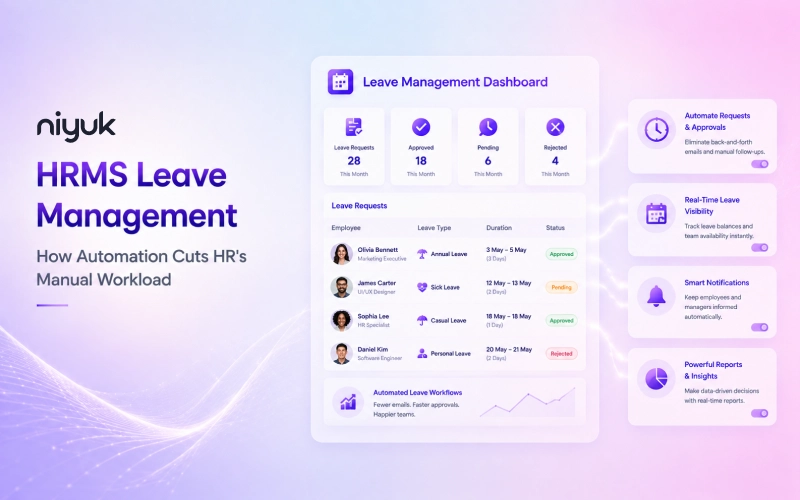
Check with almost any HR professional what highly consumes their week, and leave requests come up fast. An email asking for three days off. A message on chat because someone’s balance looks wrong. A manager approves a request, then forgets to loop in Payroll. None of these is particularly hard work individually. Just relentless, and it accumulates to a degree you can barely comprehend until you have someone look at the hours logged.
Leave management in an HRMS does this to remove recurring administrative work from HR. Instead of having a bunch of different records scattered across emails or sheets, you have one in one place which is always up to date. This article will discuss what that entails, the benefits it provides, and what should be taken into consideration before choosing it as a solution.
The True Expense of Manual Leave Management
Manual leave tracking rarely collapses all at once. It wears down a week at a time. A formula somewhere quietly goes bad, and nobody notices until it’s too late. An approval gets forgotten in the spam folder of an inbox. Two people request the same week off through the system because neither knew the other had already booked it.
Individually, none of this appears significant. Together, though, they become a steady drain on HR’s time, and the drain tends to get worse, not better, as a company grows. Here’s a number worth sitting with a 2026 benchmark study spanning more than 10 industries found that 63% of organizations are still running leave management off spreadsheets or basic manual processes. For a mid-sized employer handling around 40 leave cases a month, that translates to somewhere between $100,800 and $115,200 a year, in HR time alone, just to keep the wheels turning. A process that mostly held up for thirty people starts breaking down constantly once headcount hits two hundred, simply because there are more requests, more balances to track, and additional space for a tiny object to pass through.
Picture a mid-sized company, say around 300 employees, with one HR generalist juggling leave requests among everything else on their plate. Nothing dramatic happens at first. A single approval gets missed during a busy week, and a balance sits uncorrected for a few days. Meanwhile, an employee assumes they’re covered for a trip they’ve already booked.
By the time anyone notices the mismatch, it’s not a scheduling hiccup anymore, it’s a payroll correction and an awkward conversation nobody wanted to have. Now multiply that by a handful of similar near-misses every month. That pattern, quiet and repetitive, is really the whole argument for automating in the first place.
What Is HRMS Leave Management?
HRMS leave management, also referred to as an hr leave management system or an online leave management system is the leave management module of an HR management system that automates leave approval, leave balances, and leave policy enforcement. This system manages the processes online, replacing the old system of manual recording on spreadsheets or registers with an automated single system that is always up-to-date and connected directly to a staff’s file.
It’s worth drawing a line between this and a basic leave tracker, what US teams sometimes call paid time off tracking software, since people confuse the two constantly. A tracker is just a log, a record of who took what leave, often nothing more than a spreadsheet someone updates by hand. A full leave management system goes considerably further. It handles the entire workflow: routing, approvals, balance math, policy enforcement, start to finish, not just the record left behind afterward.
How Much Time Does Leave Automation Actually Save?
Honestly, the answer depends heavily on company size and how messy the current process already is. But where the time goes tends to follow the same pattern across most organizations.
Manual leave management burns hours in a handful of predictable places. Chasing approvals that sit unanswered for days. Manually updating balances every single time someone takes leave. Cross-checking attendance records against what was approved. Fixing payroll errors that trace straight back to an outdated spreadsheet somewhere. Proper leave management software removes most of that by updating everything the moment a request is approved, rather than days later once someone finally gets around to it.
The bigger the team, the more this compound. Ten employees taking the occasional day off is manageable by hand, no real argument there. Two hundred employees spread across multiple teams, with overlapping leave calendars and shift coverage to think through, is a fundamentally different problem, and it’s exactly where automation stops being a nice-to-have and starts being necessary.
Yes, a “traditional vs automated” comparison table is a natural fit here, this blog is essentially built around that contrast already, so making it explicit and scannable would strengthen it rather than add a tangent. Here’s a draft, kept strictly to leave management (no payroll integration mechanics bleeding in):
Leave Automation vs. Traditional Leave Management
| Aspect | Traditional (Manual) | Automated (HRMS Leave Management) |
| Leave request submission | Email, chat, or a paper form | Self-service portal, submitted directly by the employee |
| Approval routing | Manually forwarded, or waits for someone to notice it | Routed automatically to the right approver based on policy |
| Balance calculation | Updated by hand, often after the fact | Updates instantly the moment leave is approved |
| Policy and accrual rules | HR calculates entitlements manually per employee | Applied automatically per employee, per leave type |
| Visibility for managers | Requires asking HR or checking a shared sheet | Live view of who’s out and when, no request needed |
| Payroll accuracy | Manual cross-checking against leave records each cycle | Approved leave flows into payroll automatically |
| Error risk | Higher, depends on someone remembering to update records | Lower, since updates happen at the point of approval |
| HR time spent per cycle | Scales up directly with headcount | Stays relatively flat as the team grows |
Key Features Driving the Workload Reduction
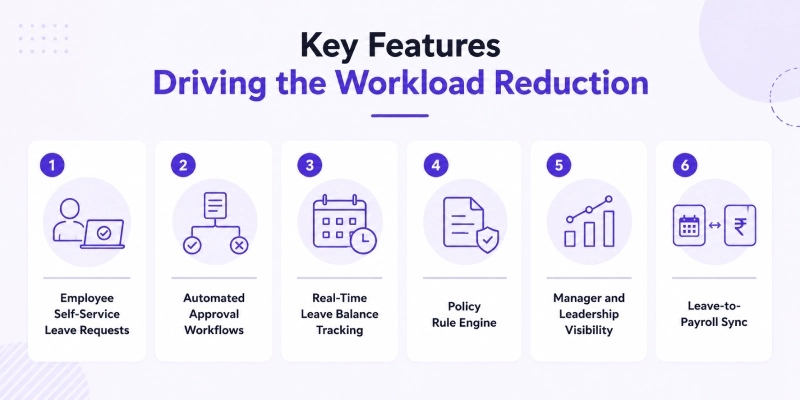
1.Employee Self-Service Leave Requests
Employees can apply for leaves on their own, check their balance before applying and even track their request status without contacting HR for an update. This all-in-one feature eliminates most of the unnecessary communication that would otherwise go to the HR department.
2.Automated Approval Workflows
A request routes straight to the right manager based on policy, not based on whoever happens to remember to forward it along. No chasing down signatures, no requests sitting unanswered simply because nobody was sure whose desk it belonged on.
3.Real-Time Leave Balance Tracking
Balances update the instant a request gets approved, not at month’s end when someone finally reconciles the spreadsheet. Good employee leave tracking software makes this visible to the employee directly, so HR isn’t stuck fielding “how many days do I have left” questions all week long. This is just employee leave tracking done properly, current the moment something changes rather than weeks later.
4.Policy Rule Engine
Every company has its own accrual rules, carry-forward limits, and leave categories to manage. An employee leave management system applies all this automatically per employee, instead of HR manually working out who’s entitled to what and when.
5.Manager and Leadership Visibility
Managers get a live view of who’s out, who’s requested leave, and where coverage gaps might show up during a busy stretch, all without having to ask HR to pull a report first.
6.Leave-to-Payroll Sync
Approved leave, whether paid, unpaid, or partial, needs to reach payroll accurately for final settlements and salary calculations to come out right. This is where one connected leave and attendance management system is a great time-saver. At the end of each period, payroll can simply draw upon the same, unified records rather than having to make sure to manually synchronize two datasets that could fall out of step. If these weren’t automated or combined, HR and payroll would have to spend an inordinate amount of time double-checking employee data across two sets in any given payroll cycle.
Benefits of HRMS leave management
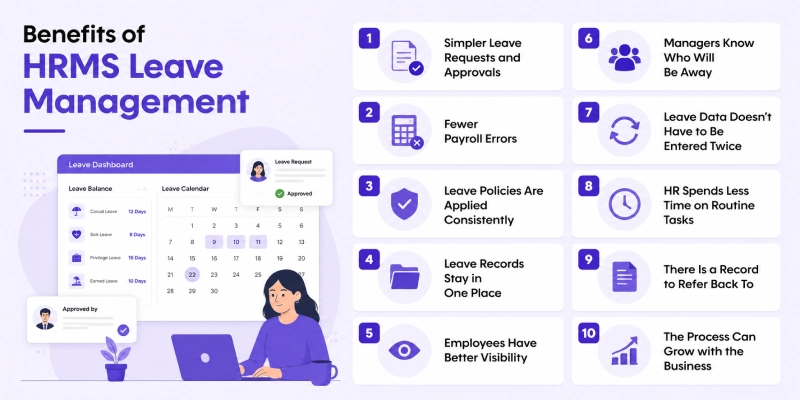
1. Simpler Leave Requests and Approvals
Applying for leave used to mean chasing an email thread or catching your manager. A leave management system skips that. Submit once, manager reviews and it’s done. Status is available right there for anyone to check, so nobody’s left wondering if their request went into a black hole.
2. Fewer Payroll Errors
Leave touches salary more than people realize, especially once unpaid days enter the picture. Route approved leave straight to payroll automatically, and HR stops typing the same numbers in twice. Fewer wrong balances, fewer loss-of-pay mix-ups, and none of those frantic last-minute corrections before payroll runs.
3. Leave Policies Are Applied Consistently
Entitlements never line up neatly across a company. One role gets a different allowance than another. Location changes it again. Then the contract throws in its own twist on top of that. Leave management software takes all that mess and lets HR configure it once, properly, instead of sitting there recalculating entitlements by hand every time someone new submits a request.
4. Leave Records Stay in One Place
Think about where leave records live right now. A spreadsheet someone updates when they remember. A few emails buried three folders deep. Maybe a paper form still sitting in a drawer from last quarter. Pull it all into one system instead, and pulling a report or spotting an absence pattern stops meaning a hunt across five different places.
5. Employees Have Better Visibility
Nobody likes messaging HR just to ask, “how many days do I have left again.” And truthfully, HR probably doesn’t love typing out that same answer for the third time this week either. Employee leave management software solves that quietly, employees pull up their own balance, file the request, watch it move, no middleman required. Throw a leave tracker on top and it gets almost too easy, one glance and they already know.
6. Managers Know Who Will Be Away
Approve leave blind, without checking who’s already out, and you’re setting up a staffing headache later. Pull up the schedule first instead. Arranging cover stops being a last-minute scramble, which matters most once being short-staffed hits production, customer service, or dispatch.
7. Leave Data Doesn’t Have to Be Entered Twice
Leave feeds into attendance and payroll either way, so keeping those records apart just creates extra work nobody asked for. Connect a leave management system to the rest of HR, and an approved request updates everything downstream on its own.
8. HR Spends Less Time on Routine Tasks
None of it is difficult in isolation. Checking a balance takes a minute. Updating a record takes a minute. Sending a reminder, following up on an approval nobody’s touched in three days, same thing, a minute here, a minute there. Except it never stays at one minute, it piles up fast. HR process automation eats into that pile in a way manual effort just can’t, and suddenly there’s actual room for recruitment, employee issues, compliance, the work that genuinely needs a human brain on it.
9. There Is a Record to Refer Back To
Someone questions a leave decision six months later, and memory alone won’t cut it. Leave management software keeps the actual paper trail, when it was submitted, who signed off, what documents backed it up. That record earns its keep during audits, disputes, and labour inspections too.
10. The Process Can Grow with the Business
Thirty employees, the process holds up fine. Three hundred, and it starts creaking at the seams. A leave management system absorbs that growth better, new people, new leave rules stacked on top of old ones, reporting that shifts as the business shifts, without HR’s workload climbing at the same painful rate as headcount.
What Goes Wrong Without Automation?
A handful of specific failure patterns show up repeatedly in manual systems. Two people on the same team book overlapping leave because nobody had visibility into the other’s request. A balance drifts into the negative because an approval got recorded late. An employee disputes their final pay because unpaid leave wasn’t reflected correctly somewhere along the way. None of these are unusual, and honestly, none of them are really anyone’s fault. They’re just what happens when the whole system depends on someone remembering to update a spreadsheet correctly, every time, without fail, indefinitely.
How to Implement Automated Leave Management?
Getting this right has less to do with picking software with the wide feature list, and a lot more to do with how you sequence the rollout. Flip everything on at once, and you’re asking for hassle. A phased approach just works well.
Here’s what that looks like:
- Map your current policies first. Each accrual rule, every exception, all of it, exactly as it exists today. Skip this step and automation has nothing solid to enforce.
- Configure before you pilot. Set the system up against that full policy set, then hand it to a single team before anyone else touches it.
- Train managers on the approval workflow specifically. This is where adoption usually falls apart, quietly. People fall back on emailing requests directly the moment the system feels unfamiliar, and old habits are hard to shake once they creep back in.
- Give it time before judging it. A full cycle, maybe two. Some of the real payoff only shows up once an entire leave year has run through the system, not before.
Skip the sequencing, and even good software ends up underused.
ROI Measurement: What to Track After Implementation
A few numbers are genuinely worth watching once the system goes live: average approval turnaround time, how many leave-related payroll corrections come up each cycle, and how much time HR spends on leave-related queries compared to before. These give a far clearer picture than a vague sense that things just feel smoother now.
Conclusion
Manual leave tracking rarely fails in some dramatic, obvious way. It just quietly costs HR time every single week, in amounts that are genuinely easy to underestimate until someone adds up the hours honestly. HRMS leave management doesn’t need to be complicated to be worth adopting. Get the fundamentals right, self-service requests, automated approvals, real-time balances, accurate payroll sync, and most of that recurring admin simply stops landing on HR’s desk in the first place.
FAQs
1. How does an automated leave management system work?
An automated leave management system lets employees apply for leave through a portal, routes the request to the right approver based on policy, updates balances in real time, and syncs the result with attendance and payroll, all without anyone touching a spreadsheet by hand.
2.What is HR automation, and how does it apply to leave management?
At its core, HR automation just means letting software handle the repetitive stuff, approvals, data entry, compliance checks, so people don’t have to. Call it hr process automation, or hr workflow automation, either way it’s the same idea applied to one specific job. For leave, that means requests, approvals, balance updates, and policy enforcement all happen on their own, no email threads, no spreadsheets, using the same hr automation tools that already run onboarding or payroll elsewhere in the HRMS.
3.What are the benefits of automating leave management for HR teams?
The manual work mostly disappears, tracking balances, chasing approvals, reconciling records by hand, all of it. Fewer errors mean few payroll disputes down the line. HR gets real-time visibility into who’s out and when, and suddenly there’s time back for work that isn’t just repetitive. That’s the real payoff of hr automation.
4.What’s the difference between a leave management system and a simple leave tracker?
A leave tracker is just a log, who took what leave, usually a spreadsheet someone updates by hand. A proper leave management system does a lot more: automated approval workflows, policy enforcement, real-time balance calculation, integration with HRMS and payroll. It handles the whole process, not just what’s left behind afterward.
5.Does an HRMS leave management system handle India-specific leave types like casual, sick, and earned leave?
Yes, assuming it’s set up properly. A good HRMS leave management system covers India-specific categories, casual leave, sick leave, earned or privilege leave, applying each company’s accrual and carry-forward rules automatically. Nobody’s tracking that by hand, person by person, anymore.
6.Can an automated leave management system integrate with payroll?
Yes. When employee leave management software is integrated with payroll, approved leave, paid, unpaid, or partial, flows directly into salary calculations, so HR doesn’t have to manually cross-check leave records against payroll every single cycle.
7.How much manual work does leave automation save HR teams?
The actual total hours saved vary by company size, but the repetitive work automation removes stays consistent. Chasing approvals over email, updating balances by hand, cross-checking attendance against leave records, and correcting payroll errors caused by outdated spreadsheets, all which scale right along with headcount.